


A virtual closet becomes useful only after the clothing photos are uploaded. The real test is whether the app helps create an outfit, plan a week, prepare a trip, retrieve an item, or avoid a duplicate purchase. I compared these products by those repeat-use jobs.
How I evaluated virtual closet apps
Written and tested by David Voskanyan. I used six scenarios: adding an initial wardrobe, scanning and filtering items, composing a look, planning for an occasion or week, separating travel or seasonal wardrobes, and reviewing data before buying. I compared how clearly the saved interface supports each job, the likely maintenance burden, and whether the product gives the user a next action after cataloging.
The repository contains first-party screenshots for all seven products and official app-store sources for Beauty AI, Whering, Acloset, and Stylebook. Product evidence was rechecked on July 18, 2026. The repository does not document identical closet imports, setup times, cross-platform sync tests, a shared test device, or long-term retention. I do not invent those results.
Scoring approach: setup clarity, retrieval, outfit creation, planning depth, repeat-use value, and evidence quality. Because there is no controlled same-closet test, I give use-case verdicts instead of numeric rankings.
Editorial disclosure: Beauty AI publishes this article and appears in it. I co-founded Beauty AI. No competitor paid for inclusion or placement, and each recommendation includes a case where another app is better.
What the preserved interfaces show
| App | Visible evidence | Evidence limit |
|---|---|---|
| Beauty AI | Analysis, wardrobe item count, wardrobe value, outfits, and visual search | No controlled closet-import time or recommendation benchmark |
| Whering | A styling canvas with separate clothes and accessories | No direct explanation of why an outfit works |
| Acloset | Outfit suggestion, chat, color, fit, rating, try-on, weather, and recent items | No evidence that every module is equally useful or free |
| Alta Daily | A weather-aware feed with named occasions and a create-avatar action | The asset is promotional and does not show closet import |
| OpenWardrobe | Separate wardrobes for a main closet, trips, and lifestyles | No captured outfit-generation sequence |
| Stylebook | Closet, looks, inspiration, calendar, packing, style stats, and sync | No Android workflow is shown in the evidence |
| GetWardrobe | A dense inventory grid with categories, filters, search, and edit controls | No recommendation or feedback screen is preserved |
Best virtual closet apps by workflow
1. Beauty AI

Beauty AI is the most relevant choice here when a closet must connect to an outfit decision. Its saved interface brings together style analysis, wardrobe items, saved outfits, wardrobe value, and Beauty Lens. That is evidence of a combined decision surface, not proof that every recommendation is accurate.
David's verdict: What worked: the closet is connected to feedback and visual discovery rather than left as a static archive. What failed: the workflow is broader than a minimalist catalog and the saved screen does not show bulk import or cross-device sync. Best for: users who want outfit feedback plus wardrobe context. Choose another app when: Stylebook is better for explicit manual planning modules, GetWardrobe for inventory-first retrieval, and Whering for visual composition.
See the virtual closet app and digital wardrobe pages.
2. Whering
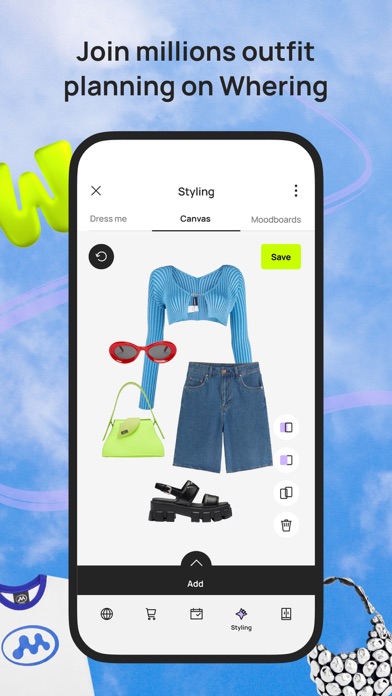
Whering's preserved screen shows a dedicated canvas where individual garments and accessories can be placed into a look and saved. That is concrete evidence for closet-based visual remixing.
David's verdict: What worked: outfit composition is direct and visual. What failed: the screenshot does not show deep inventory filters or a reasoned critique of the result. Best for: users who enjoy building outfits on a canvas. Choose another app when: GetWardrobe is better for searching a large catalog, while Beauty AI is better when the next step is outfit feedback.
3. Acloset
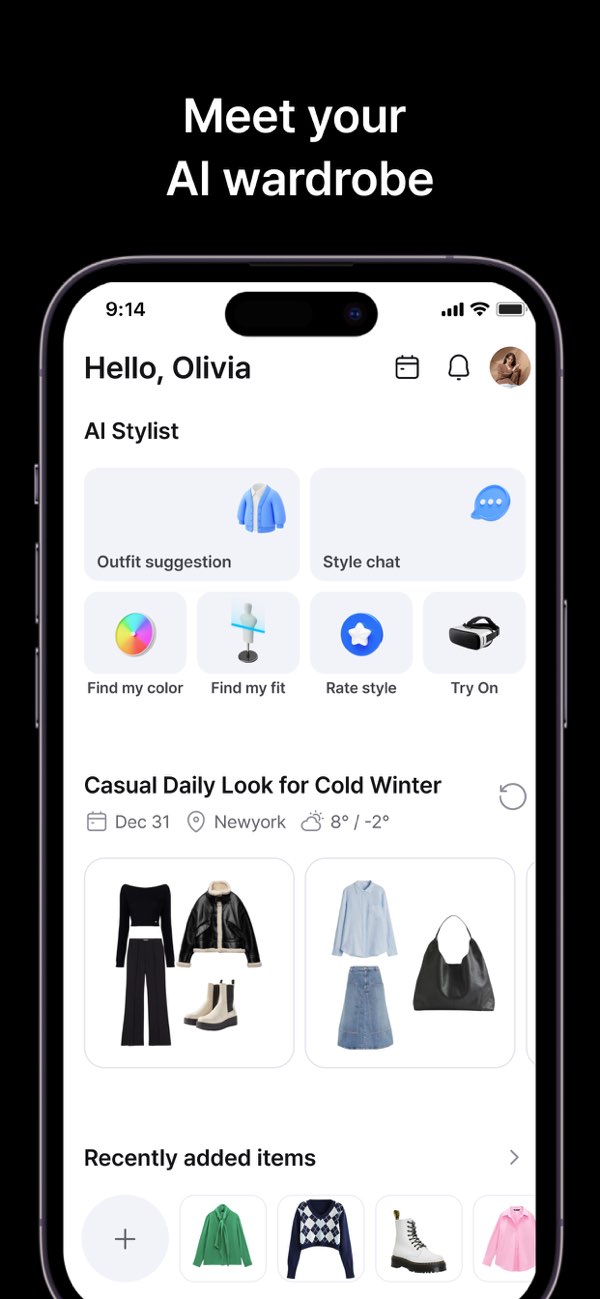
Acloset's dashboard exposes a wide set of closet-assistant functions: outfit suggestion, style chat, color, fit, style rating, try-on, weather context, and recent items. It makes the breadth of the product visible immediately.
David's verdict: What worked: several paths from closet data to a recommendation are discoverable on one screen. What failed: a feature-dense dashboard can add complexity, and the evidence does not show recommendation quality or pricing boundaries. Best for: users who want an AI-heavy closet dashboard. Choose another app when: use Whering for a simpler outfit canvas, Stylebook for manual planning, or GetWardrobe for inventory.
4. Alta Daily
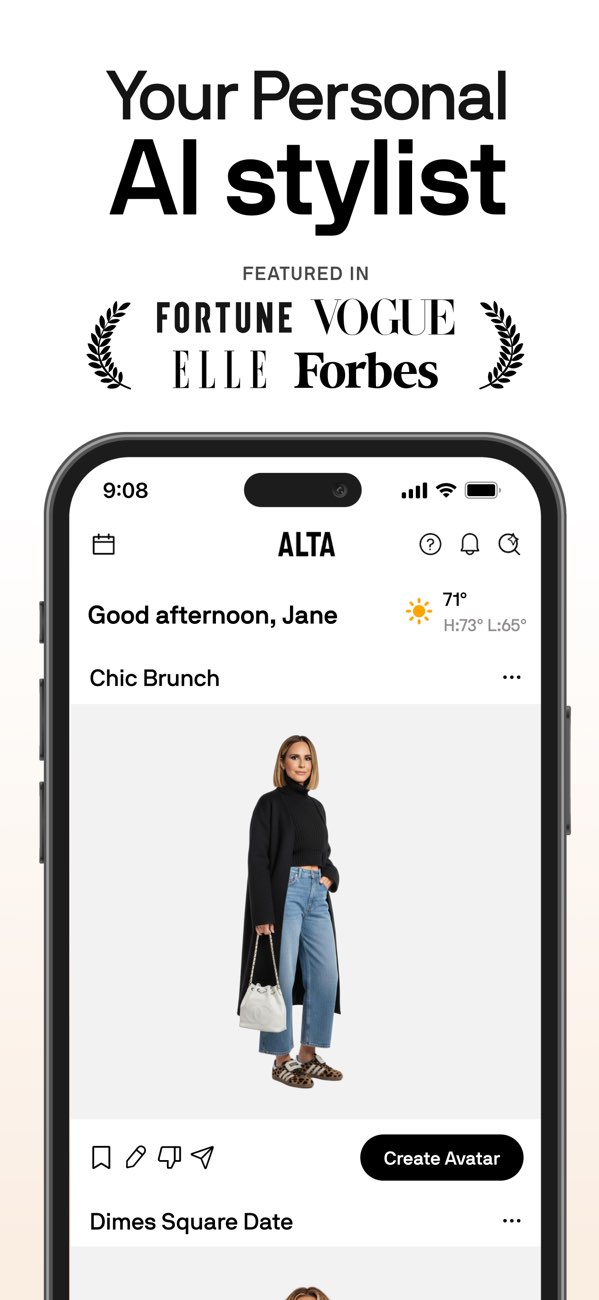
Alta Daily's saved asset shows a weather reading, named occasion cards such as “Chic Brunch” and “Dimes Square Date,” feedback controls, and a create-avatar action. That supports an occasion- and weather-led styling proposition, although the capture does not show closet import.
David's verdict: What worked: occasion and weather context are visible in the recommendation feed. What failed: the image is promotional and does not establish whether suggestions use the user's complete closet. Best for: people who want a styled daily feed organized around context. Choose another app when: Stylebook is better for explicit calendar and packing modules; Beauty AI is better when analysis of an actual outfit is the starting point.
5. OpenWardrobe
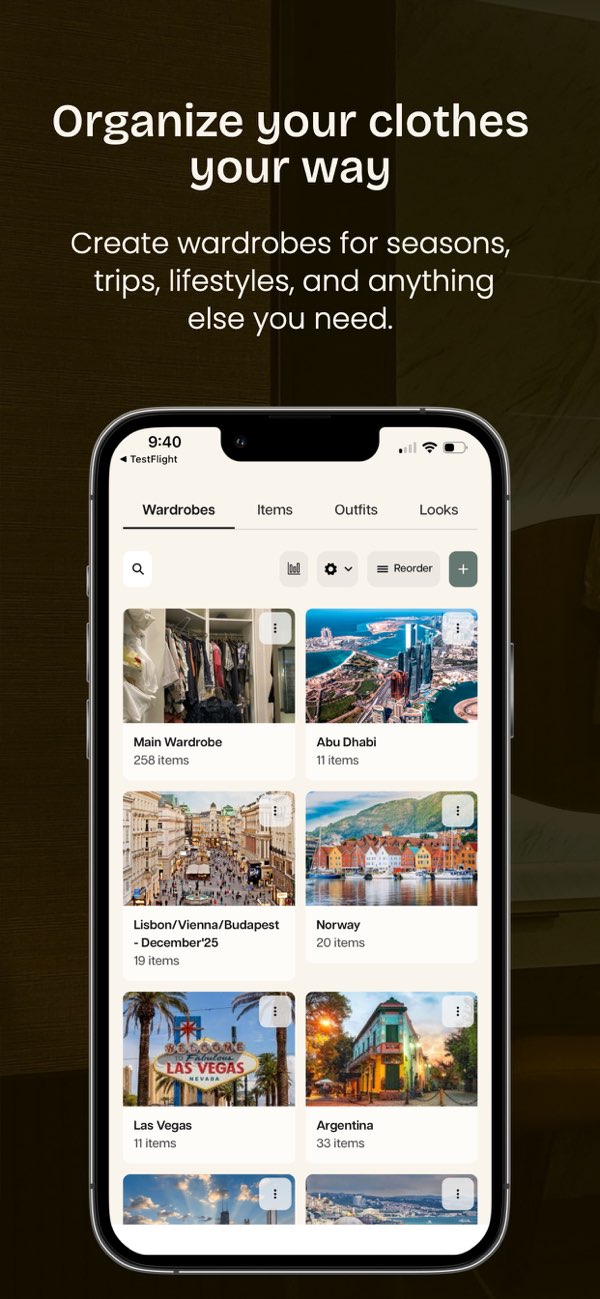
OpenWardrobe's interface shows multiple wardrobe spaces: a main wardrobe and separate trip or lifestyle collections. This is a practical information architecture for users who rotate clothing by season, location, travel, or activity.
David's verdict: What worked: separate closets reduce one-catalog clutter and make travel contexts visible. What failed: no captured sequence shows outfit creation or AI suggestion quality. Best for: users managing several wardrobe contexts. Choose another app when: GetWardrobe is better for one dense searchable inventory; Whering is better for visual outfit building.
6. Stylebook
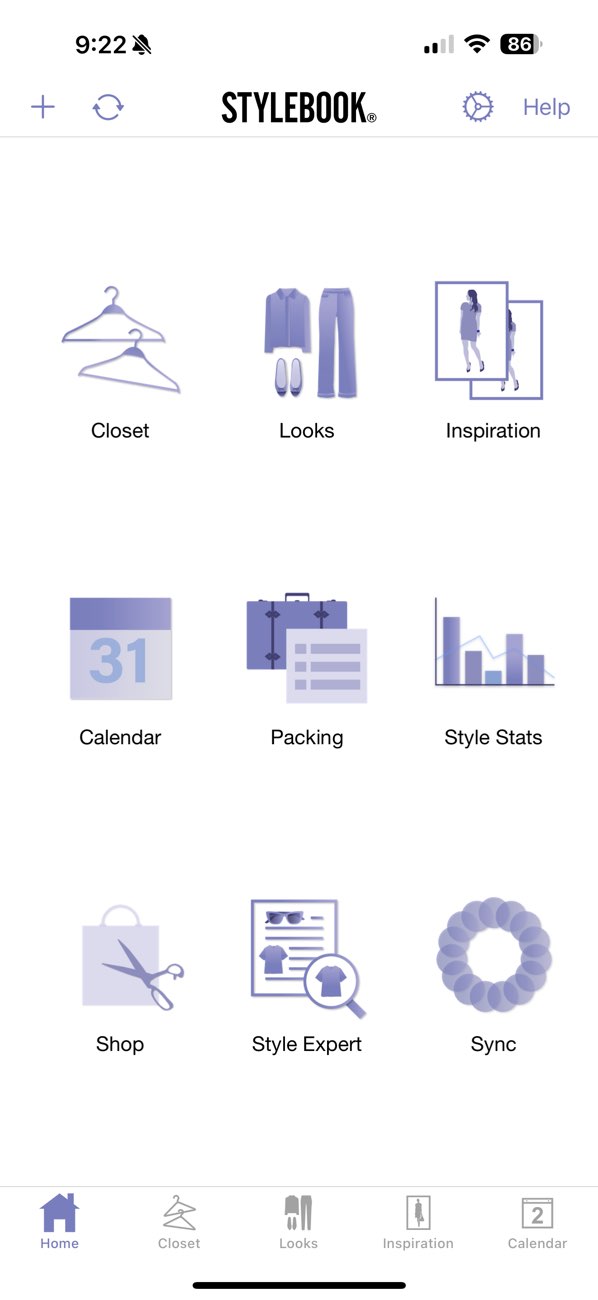
Stylebook's saved home screen is the clearest evidence of a mature manual-planning model. It exposes closet, looks, inspiration, calendar, packing, style stats, shopping, style-expert, and sync modules without presenting them as one opaque AI assistant.
David's verdict: What worked: the planning surface is explicit and covers calendars, packing, and statistics. What failed: the workflow appears more manual, and the preserved evidence is iPhone-based rather than cross-platform. Best for: detail-oriented iPhone users who want control over wardrobe records and plans. Choose another app when: Acloset is better for a broader AI dashboard; Beauty AI is better for active outfit feedback.
7. GetWardrobe
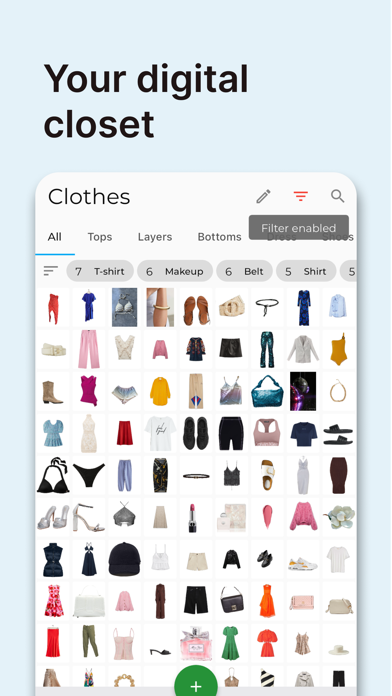
GetWardrobe's saved screen shows a high-density clothing grid, category tabs, visible filters, search, and edit controls. It is the strongest inventory-first interface evidence in this article.
David's verdict: What worked: large collections can be scanned and narrowed directly. What failed: the available image does not show styling advice, outfit critique, or how long catalog creation takes. Best for: users who primarily need a searchable wardrobe database. Choose another app when: Whering is better for an outfit canvas, Stylebook for calendar and packing modules, and Beauty AI for feedback.
Which virtual closet app should you try first?
| Main job | Start with | Documented reason |
|---|---|---|
| Connect closet data to outfit feedback | Beauty AI | Analysis, wardrobe, outfits, and visual search appear together |
| Compose looks visually | Whering | A dedicated styling canvas is preserved |
| Use a broad AI closet dashboard | Acloset | Multiple assistant modules are visible |
| Receive occasion and weather-led ideas | Alta Daily | Weather and named occasions appear in the captured feed |
| Separate travel, season, or lifestyle closets | OpenWardrobe | Multiple wardrobe spaces are shown |
| Plan manually with calendar and packing | Stylebook | Both modules are explicit on the home screen |
| Search and filter a large inventory | GetWardrobe | Filters, categories, and search are central to the captured interface |
A setup that avoids the “empty closet” problem
- Add a two-week wardrobe first. Start with recent clothes rather than trying to catalog everything.
- Create three complete outfits. A closet becomes useful once items are connected into looks.
- Add one planning context. Use next week, a trip, or an event to test whether the app changes a real decision.
- Record only useful fields. Category, color, season, and formality often matter more than purchase-history detail.
- Review after a month. If the app has not saved time, simplified packing, or prevented a duplicate, reduce the maintenance burden or choose a different workflow.
Platform and pricing limitations
Store availability, free limits, subscriptions, and cross-platform support change. The repository does not contain a current controlled platform matrix for all seven products, so this article does not repeat unsupported pricing or claim a feature is free indefinitely. Confirm the latest device support, regional terms, export options, and subscription limits in the official store before committing significant setup time.
Final verdict
The best virtual closet app is the one that keeps helping after upload. Beauty AI fits feedback plus wardrobe context; Whering fits visual outfit construction; Acloset fits a broad assistant dashboard; Alta Daily fits context-led recommendations; OpenWardrobe fits multiple closet spaces; Stylebook fits detailed manual planning; and GetWardrobe fits inventory.
For direct comparisons, see Beauty AI vs Whering, Beauty AI vs Acloset, and Beauty AI vs Stylebook. For the broader product workflow, use the digital wardrobe page.


