

A visual packing list app should show what you will wear each day of a trip, not just what you might pack. The strongest workflow combines a travel packing list app, a trip outfit planner, and a virtual closet so every item in the suitcase is connected to a complete outfit.
That distinction matters. Most people do not overpack because they lack a checklist. They overpack because the checklist does not show outfit logic. A normal list can tell you to bring shirts, pants, shoes, and jackets, but it does not show whether those pieces work together, whether one shoe pair covers three days, or whether a rain backup breaks the whole look.
The better answer is outfit-first packing: plan the travel wardrobe visually, assign every piece to a day, remove duplicates, then turn the final board into a checklist. Beauty AI is useful in that exact moment because it can help you build trip looks from your own closet instead of packing from anxiety.
Quick answer: what should a visual packing list app do?
A visual packing list app should let you plan outfits by day, activity, weather, and repeat item. It should make it obvious which clothes are doing real work, which pieces only appear once, which shoes cover the itinerary, and which backups are actually necessary. The workflow works best when it starts from a clear digital wardrobe app setup, because travel packing depends on seeing the pieces you already own.
The ideal app does five jobs at the same time:
- turn the itinerary into outfit rows
- pull candidate pieces from your real closet
- show repeat items and single-use items before packing
- separate real weather backups from fear-based extras
- convert the final outfit board into a compact packing checklist
If the app only creates a generic list, it can still be useful for toiletries, chargers, documents, and basics. But for clothes, the visual outfit board is the part that prevents the heavy suitcase.
Search intent: what users really want
The phrase visual packing list app is usually not a request for another checklist. It is a request for confidence. The user wants to see the trip wardrobe before the trip starts. They want proof that they have enough outfits without carrying too many items.
Related searches such as travel packing list app, outfit packing list app, trip outfit planner, vacation outfit planner, and travel outfit packing list all overlap, but they are not identical. A strong article and product experience should answer each one clearly.
| Search phrase | What the user is probably trying to solve | Best answer |
|---|---|---|
| Visual packing list app | They want to see outfits and items visually before packing. | Show a day-by-day outfit board with repeat items and backups. |
| Travel packing list app | They want not to forget essentials for destination, length, and activities. | Use a checklist for essentials, but add a visual outfit layer for clothes. |
| Outfit packing list app | They want clothes organized into looks, not random categories. | Plan outfits first, then generate the item list from the outfits. |
| Trip outfit planner | They want to know what to wear each day of the itinerary. | Map outfit, shoe, layer, and backup to every travel day. |
| Capsule packing list | They want fewer items without feeling underdressed. | Choose repeatable anchors and track how many outfits each item creates. |
How competitors cover this topic today
The current market splits into three styles of answer. Checklist-first apps such as PackPoint and Packr are strong for destination, dates, weather, trip length, and activity-based lists. Visual wardrobe tools such as Stylebook are stronger for seeing clothes and saving packing lists. DIY workflows in Notes, Notion, Pinterest boards, or camera rolls are flexible but require manual discipline.
That means the opening is clear: Beauty AI should not try to be only another checklist. The stronger angle is visual outfit packing from the user's own closet.
| Option | What it does well | Where it is weaker | How Beauty AI can beat it |
|---|---|---|---|
| PackPoint-style checklist | Creates packing lists from destination, length, weather, and activities. | Clothing can remain category-based instead of outfit-based. | Add outfit rows, repeat-item logic, and closet-specific combinations. |
| Packr-style travel list | Strong for multi-trip organization, weather context, and travel basics. | Still does not fully solve whether clothes become good outfits. | Use AI styling to judge outfit completeness before the list is final. |
| Stylebook-style wardrobe packing | Strong visual closet, outfit planning, and saved packing lists. | More manual and less AI-first for duplicate removal and style feedback. | Use AI to compare looks, cut overlap, and suggest stronger rewear patterns. |
| Notes, Notion, Pinterest, or camera roll | Flexible and easy to start without a new app. | No automatic closet logic, no outfit scoring, and no repeat tracking. | Turn the visual board into a guided workflow instead of a blank page. |
Visual packing grid: the core framework
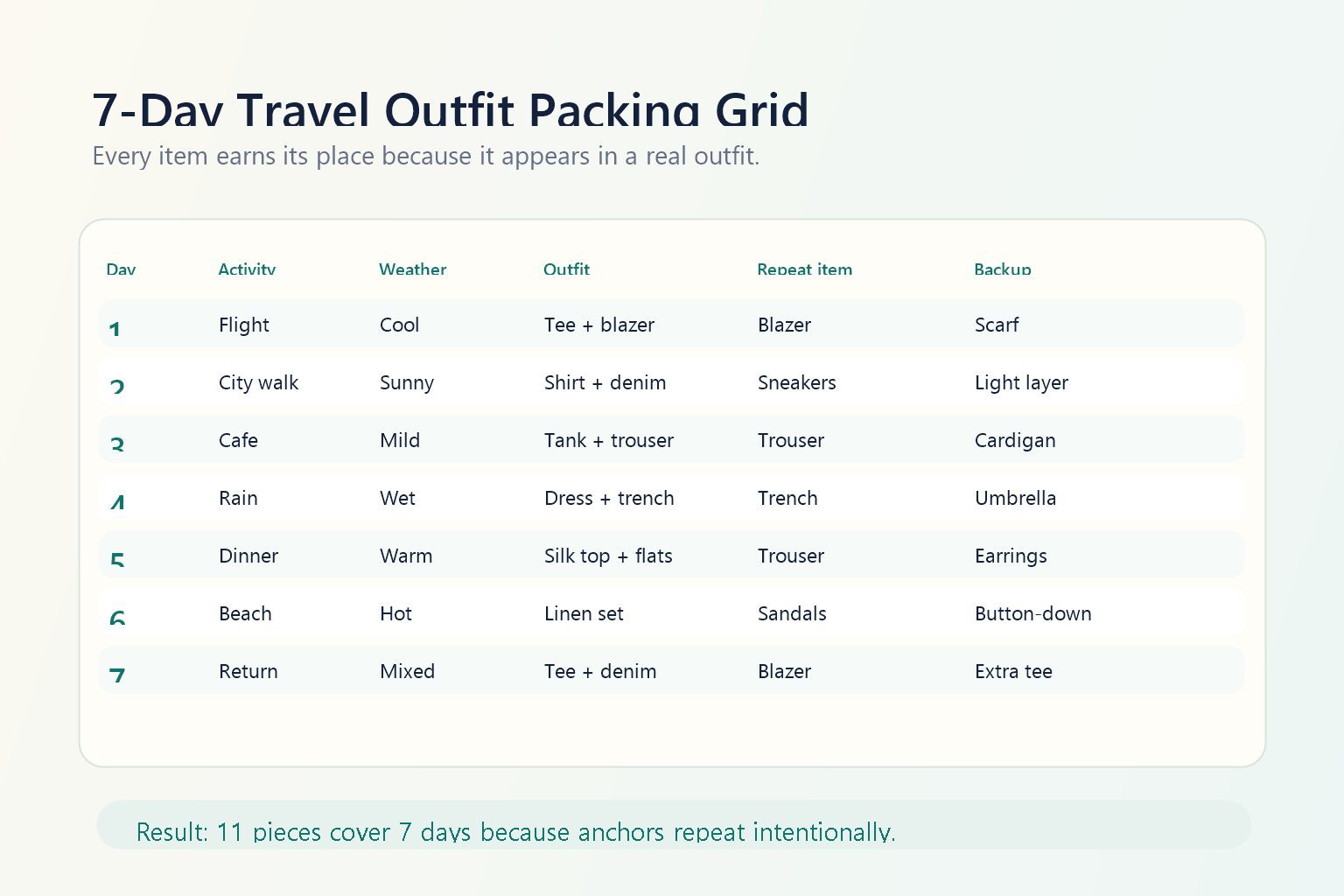
The grid is the part that turns a packing article into a usable system. Each row should represent one real travel moment. Each column should force a decision that a normal checklist hides.
Use these six columns for most trips: day, activity, weather, outfit, repeat item, and backup. This works for seven-day vacations, weekend trips, business travel, weddings, conferences, and multi-city routes.
| Day | Activity | Weather | Outfit | Repeat item | Backup |
|---|---|---|---|---|---|
| Day 1 | Flight + casual dinner | Cool evening | Tee, trouser, blazer, low sneaker | Blazer | Light scarf |
| Day 2 | City walk | Sunny | White shirt, denim, sneaker, crossbody bag | Sneaker | Overshirt |
| Day 3 | Museum + cafe | Mild | Tank, black trouser, overshirt, flat | Black trouser | Cardigan |
| Day 4 | Rain forecast | Wet | Dress, trench, water-safe shoe | Trench | Umbrella |
| Day 5 | Dinner | Warm night | Silk top, black trouser, flat, earrings | Black trouser | Blazer |
| Day 6 | Beach or pool | Hot | Linen set, sandal, tote, swimsuit | Sandal | Button-down |
| Day 7 | Return flight | Mixed | Tee, denim, blazer, sneaker | Blazer | Extra tee |
This kind of travel outfit packing list exposes waste quickly. If a skirt, jacket, shoe, or accessory does not appear in any row, it is probably not a backup. It is a guess. If one item appears in four good rows, it is an anchor. Those two signals are exactly what a basic checklist usually misses.
Why normal packing lists fail for clothes
Classic lists are good for essentials because chargers, passports, medication, sunscreen, and toiletries do not need to become outfits. Clothes are different. A top has value only if it works with the bottom, shoe, layer, weather, and activity. That makes packing clothes a combination problem.
Most weak suitcases come from four predictable failures:
| Checklist problem | What happens in real travel | Visual packing fix |
|---|---|---|
| Too many single-use items | The suitcase fills with pieces that only work once. | Require every clothing item to appear in at least one outfit row. |
| No outfit view | Good pieces do not necessarily become good looks. | Plan complete outfits before the item checklist is final. |
| Wrong shoes | Shoes look right in theory but fail for walking, rain, or dinners. | Assign shoes to days and cut pairs that do not repeat. |
| No weather backup | One shift in rain, wind, or temperature breaks the plan. | Add a backup column for layers, umbrellas, or shoe swaps. |
| No rewear strategy | The user repeats randomly and still carries too much. | Plan repeat anchors intentionally so outfits stay varied. |
Pack by outfits, not by categories
The biggest upgrade is simple: stop packing "five tops, three bottoms, two dresses" and start packing Monday through Sunday. Categories are still useful at the end, but they should not lead the decision.
Outfit-first packing forces better questions. Does this item work with more than one look? Does it solve a real activity or weather requirement? Would I still pack it if I had to remove three things from the suitcase? Does it require a special shoe, bra, bag, or layer that adds even more bulk?
This is where a virtual closet app becomes powerful. Once your closet pieces are visible, you can plan combinations before travel day, compare similar options, and notice duplicate items earlier. If your broader goal is to create looks from owned clothes, the outfit planner app workflow is the direct owner page for that need.
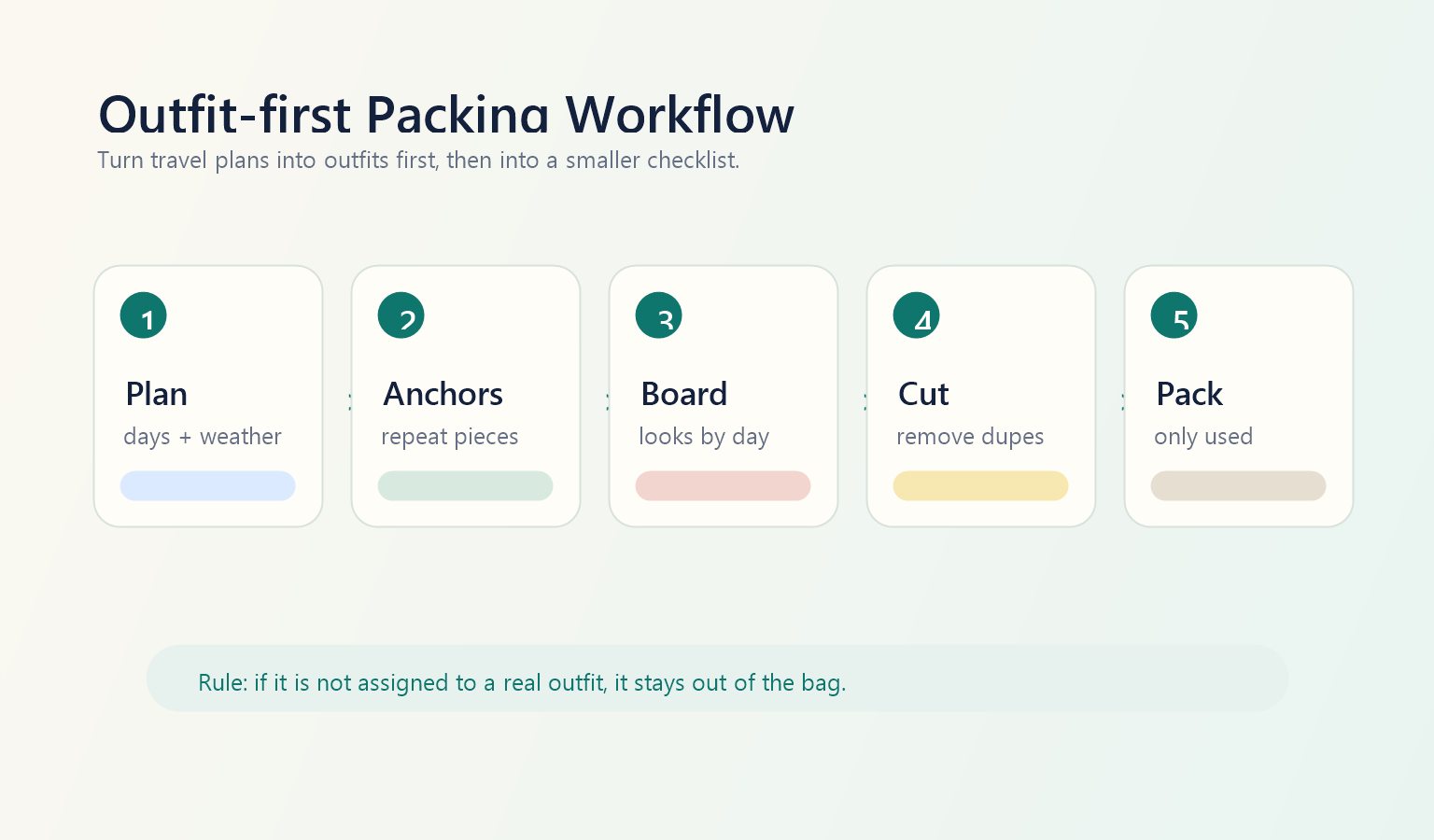
The five-step outfit-first packing workflow
This workflow is what makes a visual packing list app more useful than a blank checklist. It keeps the practical travel list, but it moves clothing decisions into a visual system.
1. Start with trip context
Write down destination, trip length, transit days, walking level, expected weather, dress codes, laundry access, and the moments where looking polished matters. A beach weekend, a conference, and a multi-city Europe trip can all be seven days long, but they need very different packing logic.
2. Pick closet anchors first
Anchors are the pieces that make the suitcase smaller. Examples include a blazer that works for flight and dinner, a black trouser that works with three tops, a sneaker that still looks clean enough for city days, or a linen shirt that works as a layer and beach coverup. Start with pieces that repeat well, not with pieces you feel guilty for not wearing.
3. Build the outfit board
Create one complete look for each day or activity. Include the shoe, bag, layer, and backup. If an outfit is only half planned, it is not ready for the suitcase. This is the part most generic packing apps do not force.
4. Remove duplicates and weak backups
Look for repeated jobs. If two black jackets do the same thing, keep the one that appears in more looks. If three tops all need the same trouser and none of them works with denim, swap one. If the backup item only works with one outfit, it may be less useful than a different layer.
5. Turn the board into the final checklist
Only after the visual board is complete should you create the checklist. At that point, the list is smaller and more accurate because it contains pieces that already have a job.
Carry-on capsule example: 11 pieces for 7 days
A strong capsule packing list does not mean wearing the same outfit every day. It means choosing anchors that can repeat without making the trip wardrobe feel stale. For a seven-day city-and-beach trip, the clothing side of a carry-on capsule can look like this:
| Category | Pieces | Why it earns space |
|---|---|---|
| Tops | White shirt, black tank, tee, silk top | Covers walking, flight, casual days, and dinner. |
| Bottoms | Black trouser, denim, linen short or skirt | Each bottom works with at least two tops. |
| One-piece | Easy dress | Works for rain day with trench or dinner with flats. |
| Layers | Blazer, trench or overshirt | Controls polish, temperature, rain, and repeat variety. |
| Shoes | Low sneaker, flat or sandal | One walking pair and one lighter pair cover most moments. |
That is 11 clothing and shoe pieces before underwear, sleepwear, swimwear, toiletries, and destination-specific gear. The important part is not the exact number. The important part is the repeat strategy: blazer repeats on travel and dinner days, trouser repeats across cafe and dinner looks, sneaker repeats on high-walking days, and the overshirt or trench protects weather uncertainty.
Rewear map: how to know whether the capsule works
A suitcase is efficient when its strongest items repeat intentionally. The simplest test is a rewear map. Count how many useful outfits each anchor creates. If an item repeats often but weakens the outfits, replace it. If an item appears once but is essential for a wedding, work meeting, or weather condition, keep it as a conscious exception.
| Item | Outfit count | Best use | Decision |
|---|---|---|---|
| Blazer | 3-4 | Flight polish, dinner, work meeting, cool evening | Pack |
| Low sneaker | 3-5 | Walking days, airport, city sightseeing | Pack |
| Statement heel | 1 | One dinner look only | Cut unless the event is important |
| Trench | 2-4 | Rain, wind, cooler mornings, travel layer | Pack if forecast supports it |
| Second dress | 1 | Backup dinner look | Cut if the first dress already works |
Trip-specific mini grids
The best AI packing list changes by trip type. A business trip, beach vacation, city break, and mixed-weather route should not use the same outfit logic.
| Trip type | Main outfit risk | Best visual packing rule | Piece to repeat |
|---|---|---|---|
| City break | Walking shoes that do not match evening looks | Plan every day around one strong walking shoe first. | Low sneaker or loafer |
| Beach trip | Too many single-use coverups and dinner pieces | Use linen, button-downs, and sandals that move from beach to casual dinner. | Linen shirt |
| Business travel | Overpacking formal pieces that do not remix | Anchor around one jacket, one trouser, and two tops that shift formality. | Blazer |
| Mixed-weather trip | No layer plan for rain, wind, or cold evenings | Give each day a primary layer and one compact backup. | Trench or overshirt |
| Wedding weekend | Formal outfit plus too many casual extras | Protect the event look, then keep the rest minimal and repeatable. | Neutral shoe or dressy layer |
Multi-city and mixed-weather packing
Multi-city travel is where visual packing becomes much stronger than a simple checklist. The problem is not only "what do I need?" It is "what do I need in city A that will not become useless in city B?"
For a route like Lisbon, Paris, and London, a checklist might add warm layers, rain gear, dinner outfits, walking shoes, and beach-adjacent casual pieces. That can become too much fast. A visual grid forces you to choose cross-city anchors instead:
- one shoe that handles most walking days
- one layer that works for cool evenings and light rain
- one trouser or jean that works in both casual and polished settings
- one dinner top that can reuse the same bottom and shoe
- one backup layer, not a separate backup outfit for every city
This is also where you should decide whether laundry access changes the plan. If you can wash or refresh clothes mid-trip, the board can get smaller. If you cannot, the board needs more base layers but still does not need duplicate jackets or shoes.
What clothes to pack for travel: a decision checklist
If you are still asking what clothes to pack for travel, use this filter before adding anything to your bag:
- Does this item appear in at least one complete outfit row?
- Does it solve a real activity, weather, or dress-code moment?
- Can it repeat without making the trip wardrobe feel weaker?
- Does it require a special shoe, bag, bra, or layer that adds more bulk?
- Would I still choose it if I had only carry-on space?
- Is it a true backup, or am I packing it because I feel uncertain?
When the answer is no, the item is probably not a backup. It is anxiety packing.
Feature checklist for choosing a visual packing list app
If you are comparing apps, do not judge only by whether they have a packing checklist. Judge by whether they help you make better clothing decisions before the suitcase closes.
| Feature | Why it matters | Priority |
|---|---|---|
| Day-by-day outfit board | Shows whether the trip is actually covered. | Essential |
| Closet import or saved wardrobe | Lets you plan from owned items instead of fantasy shopping. | Essential |
| Repeat-item visibility | Shows which pieces justify suitcase space. | Essential |
| Weather and activity fields | Prevents outfits from ignoring real travel conditions. | High |
| Duplicate removal | Helps cut overlapping jackets, shoes, and similar tops. | High |
| Checklist export | Turns the visual board into a practical packing list. | High |
| AI outfit feedback | Helps judge whether a look is balanced, practical, and varied enough. | High |
| Privacy control | Important when the workflow uses personal photos and closet images. | High |
Beauty AI workflow for visual packing
Beauty AI fits the step after you know the itinerary and before you zip the suitcase. Use it to turn your closet into a visual trip board rather than a pile of possible items.
- Choose the trip context. Add destination, days, likely weather, dress code, walking level, and the moments where photos or polish matter.
- Pull candidate pieces from your closet. Start with reliable anchors, not fantasy items. Add the pieces you already repeat well at home.
- Build outfits by day. Create the first version of the board around activity and weather, not around random favorites.
- Ask for weak-point feedback. Check whether one shoe is doing too much, whether a layer fails the weather, or whether the outfits feel repetitive.
- Remove duplicates. If two jackets, two black bottoms, or three similar shoes do the same job, keep the one that appears in more complete looks.
- Save the packing board. Keep the day-by-day lineup so you can get dressed quickly on the trip and stop re-deciding every morning.
This is also where the travel outfit planner guide and the travel capsule wardrobe guide connect. The planner helps with the trip workflow; the capsule guide helps reduce pieces without reducing outfit quality.
Copyable visual packing template
If you want the fastest version, copy this structure into any note, spreadsheet, or wardrobe app. The goal is not to make a beautiful board. The goal is to make every item accountable.
- Day: the travel day or activity block
- Activity: flight, work, sightseeing, beach, dinner, event, return
- Weather: hot, cool, rainy, windy, mixed, indoor-heavy
- Outfit: top, bottom or dress, shoe, layer, bag
- Repeat item: the piece earning extra value
- Backup: one specific item that protects the outfit
- Cut candidate: the item you will remove if the bag is too full
The extra "cut candidate" field is useful because it makes editing easier. Before you pack, choose the first pieces to remove. That prevents last-minute panic from adding more items instead of refining the board.
Limitations: what an app cannot know for you
A visual packing list app can improve the structure, but it cannot fully know comfort, fabric behavior, laundry tolerance, local dress norms, or how your body feels in a shoe after eight hours. Treat AI and visual boards as decision support, not a replacement for practical judgment.
For best results, manually verify:
- the shoe you plan to walk in is already broken in
- rain layers work with the actual bag and shoe plan
- fabrics suit humidity, heat, or long transit
- formal outfits match the event or work setting
- personal photos or closet uploads are handled in a way you are comfortable with
Action: create a day-by-day travel outfit board
Before your next trip, make one board with seven rows: day, activity, weather, outfit, repeat item, and backup. Start with the clothes you already own, then use Beauty AI to compare combinations and remove duplicates. The goal is not the smallest suitcase at any cost. The goal is a suitcase where every item has a job and every day already has an outfit.
Source note
This guide compares Beauty AI's outfit-first workflow with the current public positioning of checklist-first travel packing apps such as PackPoint and Packr, and with visual packing guidance from Stylebook's packing article and Stylebook's road trip packing article. The recommendation above is our editorial interpretation: generic checklists help you remember items, while visual outfit grids help you pack fewer weak pieces.
Related travel and closet guides
If packing exposes missing pieces, use the wardrobe gap analysis app before shopping. If your trip includes work, dates, concerts, or weddings, pair the packing board with the office outfit planner app, date night outfit generator, concert outfit generator, and wedding guest outfit generator.
FAQ
What is a visual packing list app?
A visual packing list app helps you see the clothes, outfits, repeat items, and backups for a trip before you pack. The best version shows outfits by day rather than only listing item categories.
Is a visual packing list better than a normal packing checklist?
For clothes, yes. A normal checklist is useful for toiletries and essentials, but a visual packing list is better for avoiding single-use clothing, duplicate shoes, and weak outfit combinations.
How many clothes should I pack for a 7-day trip?
Many seven-day trips can work with roughly 10-12 core clothing and shoe pieces if you repeat anchors intelligently. The exact number depends on weather, laundry, dress code, and whether the trip includes beach, business, or formal events.
Can Beauty AI make a travel packing list?
Beauty AI can support the outfit-planning layer: building looks from your closet, comparing combinations, removing duplicates, and saving a day-by-day board. You should still keep a basic checklist for toiletries, documents, chargers, medication, and non-clothing essentials.
What is the biggest packing mistake?
The biggest mistake is packing by anxiety instead of outfits. If an item is not assigned to a real day, activity, weather condition, or backup role, it usually adds bulk without improving the trip wardrobe.
What is the difference between a packing list app and an outfit packing list app?
A packing list app focuses on what to bring. An outfit packing list app focuses on how the clothing works together. For travel clothes, the second approach is more useful because it shows the actual looks, not only the item count.


