


What if your attic bins were as searchable as your email inbox? For most of us, seasonal storage is a black hole where favorite coats and summer linens go to be forgotten. It's frustrating to buy a new wool blazer only to find an identical one buried in a plastic tub three months later. To track seasonal clothes in storage effectively, use a digital wardrobe app to photograph items before they're packed. Assign each item a digital tag corresponding to a numbered physical bin, such as Bin #4: Winter Knits. This allows you to search for a navy cashmere sweater on your phone and know exactly which box to open, preventing duplicate buys and closet clutter.
Learn how to bridge the gap between your storage and your daily style by digitally cataloging every seasonal item you own. Follow this guide to organize by location and use digital tools for a seamless transition between seasons. We'll cover maintaining a searchable database and keeping your bedroom closet free of off-season bulk.
Key Takeaways
- Eliminate the "hidden inventory" problem by replacing vague physical labels with a detailed visual record of every stored item.
- Identify why visual wardrobe apps outperform spreadsheets for maintaining a searchable, style-focused inventory of your off-season garments.
- Follow a streamlined workflow to track seasonal clothes in storage using high-quality photos and digital location tags.
- Use your digital inventory to plan future outfits and verify style matches before you physically retrieve your items from storage.
Table of Contents
Why Tracking Seasonal Clothes in Storage is Essential for a Functional Wardrobe
Seasonal storage often becomes a "black hole" for your personal style. While clear bins offer some visibility, they fail once you stack more than three containers in a dark attic or garage. You lose visual access to your items, creating a "hidden inventory" that leads to unnecessary spending. When you can't see your clothes, they effectively cease to exist in your daily planning. Using a system to track seasonal clothes in storage transforms these boxes into an accessible extension of your bedroom closet. It acts as a personal search engine, allowing you to find a specific item without moving a single heavy bin. This digital oversight provides a psychological sense of control, turning a chaotic pile of boxes into a structured asset.
The Cost of Disorganized Storage
Forgotten clothes are expensive. The "duplicate purchase" trap happens when you buy a new cream turtleneck or leather boots simply because you've forgotten you already own them. Beyond the financial drain, disorganized storage causes physical clutter. Items left in bins for years without review may suffer from undetected moisture or pests. When you track seasonal clothes in storage, you ensure every garment has a fixed purpose and a clear timeline for its return to your active wardrobe.
Bridging the Physical and Digital Gap
Creating a "Digital Twin" of your stored items removes the friction of seasonal transitions. Digital wardrobe tracking is the process of maintaining a virtual inventory of physical garments stored elsewhere. By using a digital wardrobe app or a virtual closet app, you maintain a visual record that stays with you on your phone. This bridge allows you to plan outfits for next season while your physical clothes are still tucked away. It ensures you only buy what truly complements your existing collection, making the transition to cooler or warmer weather effortless.
Comparing Digital Tracking Methods: Spreadsheets vs. Wardrobe Apps
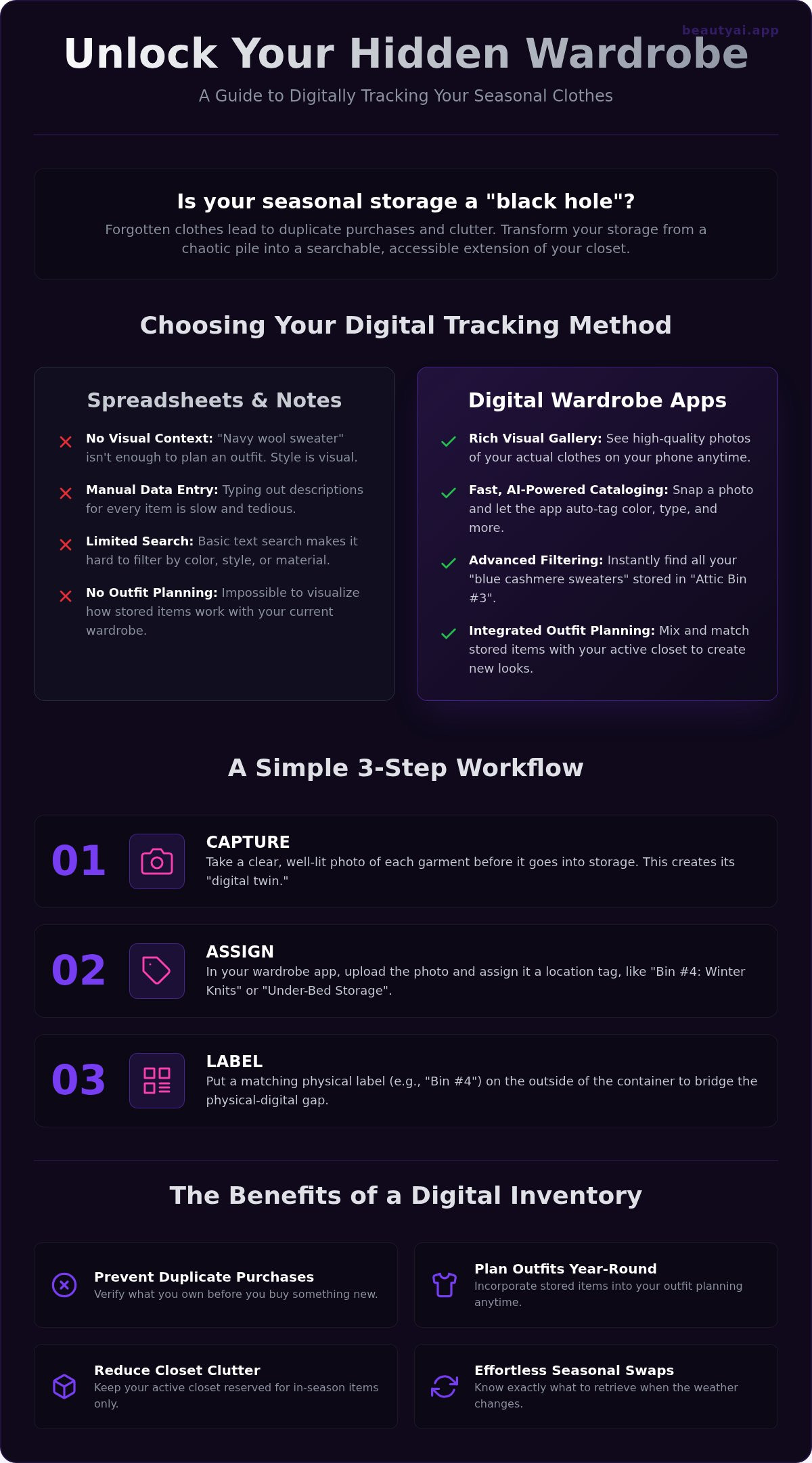
While a simple list might seem sufficient, it quickly becomes unmanageable as your collection grows. Spreadsheets are effective for technical data like purchase dates or prices, but they lack the visual dimension required for style planning. Notes apps offer a faster entry point but fail when you need to filter by specific attributes like material or color. To effectively track seasonal clothes in storage, you need a system that prioritizes visibility over text. A dedicated virtual closet app bridges this gap by turning your storage bins into a searchable visual gallery that lives on your phone.
Functionality Comparison
Manual data entry is a significant time sink. Typing "navy blue wool sweater" into a spreadsheet takes longer than snapping a quick photo. Modern apps use AI to identify garment types and colors instantly, reducing your cataloging time from hours to minutes. Seeing a clear image of your actual garment is far more useful than a generic text description. It allows you to distinguish between your heavy winter knits and lighter spring layers without opening a single box. This visual search capability is the most efficient way to track seasonal clothes in storage without physical labor.
Why Visual Context Matters
Style is visual, not verbal. Seeing your stored items in a digital format helps you decide if they still align with your current aesthetic before you physically retrieve them. This visual context is essential for a foundational setup that actually works for your daily life. You can experiment with new combinations and see how your stored boots look with your active-closet jeans. It prevents the frustration of unpacking clothes that no longer fit your style. If you want to simplify your seasonal swap, start cataloging your wardrobe today to keep every item within reach, no matter where it is physically stored.
A Step-by-Step Workflow to Catalog Your Seasonal Storage
Transforming your seasonal swap into a digital system requires a methodical approach. Start with a "Clean and Sort" phase to ensure you only store items worth keeping. Review each piece for wear, damage, or style relevance before it enters your long-term inventory. Once you've curated your collection, follow these steps to track seasonal clothes in storage effectively:
- Capture: Take a clear photo of each garment before packing it into a container.
- Assign: Place items into physical bins and immediately create a corresponding digital record in your app.
- Label: Use numbered labels or QR codes on the outside of your bins to link the physical box to your digital data.
Capturing the Perfect Inventory Photo
Good lighting is the foundation of a searchable digital wardrobe. Avoid harsh shadows by photographing your clothes in natural, indirect light. Lay the garment flat on a neutral background or hang it against a plain wall to ensure the AI can accurately identify the silhouette and color. Review these detailed instructions on how to photograph clothes for a wardrobe app to create a high-quality inventory. Consistency in your photography makes your digital closet much easier to navigate during the off-season.
Tagging and Categorization Logic
Precision in your digital tagging saves time during retrieval. Use specific location tags like "Bin #1" or "Basement Shelf B" to pinpoint exactly where an item lives. Combine these with category tags such as "Heavy Knit" or "Ski Wear" to make your storage fully searchable. This logic allows you to find your favorite cashmere scarf or waterproof boots without digging through five different boxes. To start building your own searchable inventory, download the app and catalog your first bin today. This simple habit ensures your style remains organized and accessible year-round.
Maximizing Your Digital Wardrobe with Beauty AI
Leverage your cataloged inventory to eliminate the friction of seasonal transitions. Browsing your summer dresses while snow is still on the ground is simple when you use a digital wardrobe app. This visual access helps you track seasonal clothes in storage without physically moving a single box. If you encounter a mystery item in an unlabeled bin, use the "Find Clothes from a Photo" feature to identify it and update its digital record instantly. It is the most efficient way to track seasonal clothes in storage while maintaining a clutter-free home. You can also get AI outfit feedback on stored items to see how they pair with your recent purchases. This proactive approach reduces seasonal anxiety by providing a clear visual roadmap for your upcoming wardrobe shift.
Planning Ahead with Virtual Try-On
Visualize your future style using virtual try-on technology. This tool lets you "wear" your stored garments digitally, helping you decide which pieces still fit your aesthetic. You might realize a stored trench coat perfectly complements a new pair of loafers. Making these decisions digitally prevents you from unpacking items that won't actually get worn. Use these visualizations to curate what earns a spot in your closet and what should remain in storage for another season.
The Seamless Seasonal Swap
Organize your transition by creating a "To-Unpack" list within the app. Prioritize essential layers first, such as light jackets or transitional knits, based on your digital inventory. Beauty AI removes the guesswork from seasonal dressing by keeping your entire collection visible. This method ensures that every item you bring back into your active rotation has a specific purpose and a pre-planned outfit waiting for it. You'll spend less time digging through bins and more time enjoying your refreshed style.
Mastering Your Seasonal Transitions
Effective wardrobe management depends on visibility. By replacing vague physical labels with a digital inventory, you transform hidden storage into a searchable extension of your closet. This systematic approach ensures your off-season items remain active assets rather than forgotten expenses. You'll now use your phone to locate specific pieces, plan future outfits, and avoid the cost of buying duplicates.
To track seasonal clothes in storage with professional efficiency, adopt a workflow that links physical bins to a visual database. This strategy removes the friction from your daily routines and keeps your bedroom closet clutter-free.
Download Beauty AI to start tracking your seasonal wardrobe today. Premium users enjoy unlimited digital storage and AI-powered outfit planning on both iOS and Android. Take control of your collection and make your next seasonal swap the most organized one yet.
Frequently Asked Questions
How do I start a digital inventory if I already have clothes in storage?
Start by opening one bin at a time during your next seasonal transition or a dedicated organization day. Snap quick photos of each item and upload them to your app before repacking. Use the "Find Clothes from a Photo" feature to quickly categorize older items you may have forgotten. This incremental approach prevents overwhelm while building a searchable database of your entire off-season collection.
What is the best way to label physical bins to match a wardrobe app?
Use a simple alphanumeric system like "Bin A1" or "Box 04" on large, waterproof labels. Within your wardrobe app, create custom folders or location tags that mirror these physical labels. This direct link allows you to track seasonal clothes in storage with precision. When you search for a specific item on your phone, the app immediately tells you which physical container to open.
Can I use a digital wardrobe app to track clothes for my whole family?
Yes, you can manage multiple family members by using custom tags or separate folders for each person. Create specific categories like "Kids Winter" or "Partner Summer" to keep the inventories distinct. This centralized system helps you track seasonal clothes in storage for everyone in the household. It prevents duplicate purchases of snow boots or raincoats because you'll know exactly what still fits and where it's kept.
Do I need to take a photo of every single item to track seasonal clothes?
Focus on individual garments rather than bulk shots for the best results. While it takes slightly longer initially, individual photos allow the AI to provide styling feedback and include items in virtual outfit planning. You don't need professional quality; a clear shot on a neutral background is sufficient. Detailed records ensure that every stored item is searchable and ready for your next seasonal transition.
How often should I update my digital storage inventory?
Update your inventory twice a year during your major seasonal swaps. When you pull summer clothes out and pack winter items away, take a few minutes to delete items you've donated and add any new purchases. This consistent maintenance keeps your digital closet accurate and useful. Regular updates ensure your app remains a reliable tool for planning outfits and managing your home's storage space effectively.


