

Most people searching for apps that design clothes don't actually want to draft sewing patterns or calculate fabric tension. Digital tools split cleanly into two distinct categories: technical garment-construction software and personal outfit planners. If your goal is to build an original piece from scratch for production, tailoring, or illustration, you need a specialized patternmaking program. But if your goal is styling, like testing whether an oversized blazer pairs with pleated trousers or casual sneakers, you need a digital wardrobe planner instead.
It's frustrating to waste hours downloading complex CAD programs when you simply want to visualize your daily rotation before getting dressed. This guide clarifies the practical differences between professional garment-drafting platforms and styling apps so you can pick the right workflow immediately. You'll discover which tools handle creative sketching, which apps streamline outfit creation, and how to test complete looks digitally using photos of garments you already own.
Key Takeaways
- Explore how apps that design clothes diverge into technical pattern drafting tools and digital wardrobe planners.
- Compare professional sketching software features, like vector brushes and croquis layers, with daily styling workflows.
- Learn how digitizing items you already own allows you to design balanced outfits without sewing a stitch.
- Apply a straightforward four-step framework to select the right platform for your budget, hardware, and creative goals.
Table of Contents
Garment Construction vs Outfit Styling: Which App Do You Need?
Searching for apps that design clothes typically leads to two completely different software categories. The broader field of digital fashion includes both the technical engineering of individual textiles and the virtual coordination of finished garments. Clarifying your end goal immediately saves hours of trial and error.
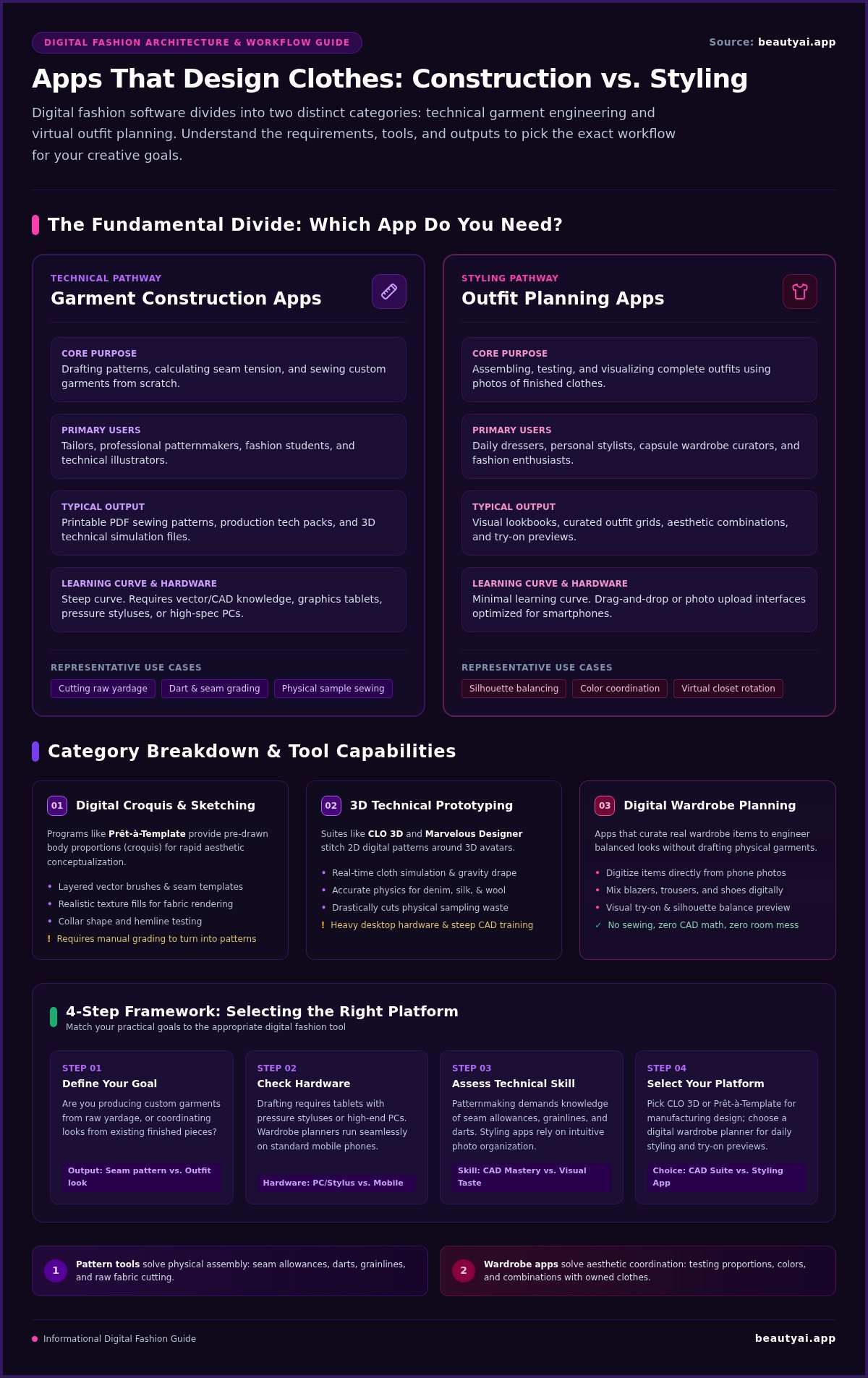
You don't need drafting rulers, vector math, or patternmaking experience just to explore aesthetic ideas. The table below breaks down how these two app types differ in purpose, input, and everyday utility:
| Feature | Garment Construction Apps | Outfit Planning Apps |
|---|---|---|
| Core Purpose | Drafting patterns and sewing custom garments | Assembling and testing outfits with existing clothes |
| Primary User | Tailors, patternmakers, and fashion illustrators | Daily dressers, stylists, and capsule wardrobe curators |
| Typical Output | Printable PDF patterns or 3D technical files | Visual lookbooks, outfit grids, and try-on previews |
| Learning Curve | Steep (requires construction knowledge) | Minimal (drag-and-drop or photo upload) |
When to Choose Patternmaking and Fashion Illustration Software
Choose technical apparel software if you plan to cut raw yardage, operate a sewing machine, or produce production-ready tech packs. These platforms demand precise seam allowances, grainlines, and digital pencil hardware to draw customized croquis figures.
When to Choose Digital Wardrobe and Outfit Planning Apps
Choose an outfit planning app if your creative vision focuses on styling finished pieces. Instead of calculating seam tension, you work with photos of actual items to balance silhouettes, explore color palettes, and preview full looks. If you want to see how existing pieces translate visually before dressing, reviewing the best virtual try-on apps will point you toward tools designed specifically for styling rather than apparel manufacturing.
Creative Tools for Designing Custom Garments from Scratch
Exploring specialized apps that design clothes reveals an ecosystem built around precision vector drawing, textile simulation, and pattern grading. These programs give fashion students, independent makers, and tailors the technical infrastructure needed to draft wearable garments before cutting a single yard of fabric.
Drafting apparel on a smartphone screen remains notoriously difficult. Detailed seam placements, dart curves, and grainline adjustments require pressure-sensitive styluses and larger tablet displays. Without that physical control, turning raw ideas into functional tech packs often leads to fitting errors during sample sewing.
Digital Croquis and Fashion Sketching Platforms
Dedicated illustration platforms like Prêt-à-Template allow designers to sketch directly over proportional human figures called croquis. These tools feature layered vector brushes, seam templates, and realistic texture fills. Illustrators quickly test collar shapes or hem drops without redrawing anatomy repeatedly. However, moving from an aesthetic flat sketch to a printable sewing pattern still requires manual grading or specialized CAD software.
3D Prototyping and Technical Apparel Suites
Advanced environments like CLO 3D and Marvelous Designer deliver real-time cloth simulation. Designers stitch virtual pattern pieces together around customizable avatars to see how silk, heavy denim, or wool jersey drape under gravity. These platforms significantly reduce physical sampling waste. Yet their steep learning curves and heavy computer hardware requirements make them impractical for everyday dressing.
Most consumers simply want to explore how finished pieces look on their frame without building 3D meshes. Research from the Wilson College of Textiles highlights how a modern Virtual Fitting Room uses rendering to preview fit and silhouette. If your objective is styling wearable ensembles rather than drafting patterns, you can download Beauty AI to assemble looks directly from closet photos.
How Digital Wardrobe Apps Let You Design Outfits with Existing Clothes
You don't need a bolt of fabric to create something original. Modern apps that design clothes let you engineer brand-new outfits using the items already hanging in your closet. Instead of drafting flat patterns, you curate aesthetics digitally, testing fresh combinations without cluttering your bedroom floor.
Building Your Virtual Closet from Real Garment Photos
Start by capturing clean photos of individual items. Lay each piece flat on a neutral background or hang it against a plain door in bright, indirect light. A reliable digital wardrobe app automatically strips away messy backgrounds and categorizes your clothes into tops, bottoms, outerwear, and footwear. This structured inventory transforms scattered garments into modular building blocks ready for coordination.
Previewing Proportions and Styling Logic with AI Feedback
Once your wardrobe is cataloged, you can assemble complete looks on screen. Test whether wide-leg trousers balance an oversized trench, or pair contrasting textures like chunky knitwear and slip skirts. Modern AI styling engines assess these combinations by evaluating visible color harmony, silhouette proportions, and occasion suitability.
Virtual try-on tools then project those layered pieces directly onto your photo, helping you assess overall balance before dressing. Keep in mind that generated try-on previews serve as visual styling guides rather than guarantees of physical garment fit, fabric stretch, or tailoring accuracy. Ready to restyle your closet in minutes? Download Beauty AI today to start generating balanced outfits from your personal photo library.
Selecting the Best Fashion App for Your Everyday Creative Goals
Finding the right software comes down to isolating what you actually want to produce. If you want to cut patterns, select an illustration suite. If your objective is planning weekly outfits, choose a digital organizer. Applying this quick framework ensures you download the right platform on day one.
Step-by-Step Decision Checklist for Fashion Enthusiasts
Work through these four practical checks before installing any software:
- Define the end product: Do you need printable pattern blocks for physical tailoring, or a clean visual lookbook for daily dressing?
- Check your devices: Sketching software requires tablets and pressure-sensitive styluses; wardrobe planners run smoothly on everyday iPhones and Android devices.
- Audit storage and permissions: Review how each app stores wardrobe photos and handle camera permissions before uploading your items.
- Verify pricing models: Check app store listings directly to distinguish between free utilities, one-time purchases, and recurring subscriptions.
Streamlining Daily Style Without the Complexity of CAD
Professional CAD platforms can demand 80 to 120 hours of training before a user becomes fully proficient. That steep curve makes little sense if your primary goal is curating a sharp capsule wardrobe or solving daily dressing dilemmas. Mobile styling apps replace technical drafting equations with streamlined visual organization.
Personal style flourishes through consistent planning rather than complicated drafting software. Cataloging physical pieces into a capsule wardrobe app provides the quickest path to testing fresh silhouettes without sewing machines or pattern paper. If you want an intuitive way to explore apps that design clothes for actual daily wear, try building your digital closet and testing new combinations directly on your phone.
Bring Your Wardrobe Ideas to Life
Choosing the right creative software begins with a simple question: are you stitching a garment or building a look? Technical CAD tools excel at flat sketching and grading pattern blocks, but they introduce unnecessary complexity if your goal is getting dressed with intention. Exploring apps that design clothes reveals that coordinating existing pieces offers the fastest, most sustainable route to elevated personal style.
Digitizing your closet removes the morning friction of pairing silhouettes, contrasting textures, and testing color harmonies. When you upload photos of your actual garments, smart algorithms evaluate visual proportions and offer immediate outfit feedback. You can even preview finished looks on your frame using realistic virtual try-on technology before stepping outside.
Take control of your daily aesthetic today. Start organizing your closet and testing new looks with Beauty AI on iOS or Android, and turn your existing wardrobe into an organized hub of creative combinations.
Frequently Asked Questions
Can I design physical clothes using a mobile phone app without professional training?
You can sketch basic concepts on a phone, but manufacturing physical garments requires technical patternmaking knowledge. Most mobile apps lack the precision controls needed for grainlines, seam allowances, and multi-size grading. Beginners often find that smartphone screens are too small for accurate technical drafting. If you want to experiment creatively without formal training, styling apps offer a far more practical entry point than garment CAD tools.
What is the main difference between a clothing design app and a digital wardrobe app?
The main difference lies in whether you build individual garments or coordinate complete looks. Clothing design software focuses on technical drafting, fabric simulations, and sewing patterns for making new pieces from scratch. In contrast, digital wardrobe apps let you organize existing garments, experiment with layering, and test styling ideas using wardrobe photos. Both fall under apps that design clothes, but they serve entirely different creative goals.
Do outfit planning apps let me see clothes on my own body?
Yes, many modern platforms offer virtual try-on features that project digitized garments onto your photo. These tools help you evaluate visual proportions, color contrast, and layering combinations before dressing. However, keep in mind that generated try-on previews provide approximate visual styling references rather than exact tailoring assessments. They show how pieces look together visually, not how the physical fabric stretches or feels against your skin.
Can apps turn my clothing sketches into real sewing patterns automatically?
No mobile app can reliably convert a freehand creative sketch into a production-ready sewing pattern automatically. Technical pattern drafting requires exact mathematical measurements, ease allowances, dart placements, and fabric stretch values that flat drawings cannot communicate. While specialized desktop software assists professional patternmakers, bridging the gap between artistic illustration and wearable physical construction still requires human tailoring expertise and manual pattern grading.
Do I need special equipment like an Apple Pencil to design outfits digitally?
You don't need a stylus or tablet if you use apps that design clothes through wardrobe planning. Styling apps work entirely with smartphone touchscreens, using camera photos and simple drag-and-drop interfaces to build looks. Styluses like the Apple Pencil are only necessary if you choose technical illustration software to draw freehand croquis sketches, vector seam lines, or detailed textile prints from scratch.


