

A digital wardrobe only works if it mirrors your physical reality every single week. You might take the time to photograph every button-down shirt, pair of jeans, and leather boot, but the entire system collapses the moment your screen suggests an outfit that is currently sitting in the laundry hamper. Without routine digital closet maintenance, cluttered photo grids and out-of-sync garments quickly slow down your dressing decisions instead of speeding them up.
Keeping your digital inventory accurate shouldn't feel like a tedious second job. You don't need exhausting weekend cleanouts to maintain order; you just need a focused, 15-minute weekly reset. This simple checklist shows you how to manually update laundry status, archive off-season layers, and clear inactive pieces. By aligning your virtual library with what is actually clean and ready to wear, you ensure every saved outfit combination is immediately usable on busy mornings.
Key Takeaways
- Prevent catalog drift by establishing a routine for digital closet maintenance that reflects what is genuinely clean and ready to wear.
- Tag laundry, tailoring, and dry-cleaning items manually so your outfit planning never relies on clothes that are out of rotation.
- Archive off-season pieces into dedicated categories to keep your daily visual grid fast and clutter-free without deleting garment data.
- Streamline morning decisions by pairing an accurate digital wardrobe with visual styling tools to assemble dependable outfits in seconds.
Table of Contents
What Is Digital Closet Maintenance and Why Does It Matter?
Digital closet maintenance is the habit of keeping your virtual wardrobe aligned with what actually hangs in your physical space. When you first catalog your wardrobe, the grid looks pristine. Over time, garments get dirty, head to the tailor, or shift into storage bins under the bed. Without routine calibration, your digital inventory suffers from catalog drift. Phantom garments clutter your screen, while newly acquired pieces remain unlogged. This disconnect wastes time and causes unnecessary decision fatigue during busy weekday mornings.
The Problem of Digital Wardrobe Drift
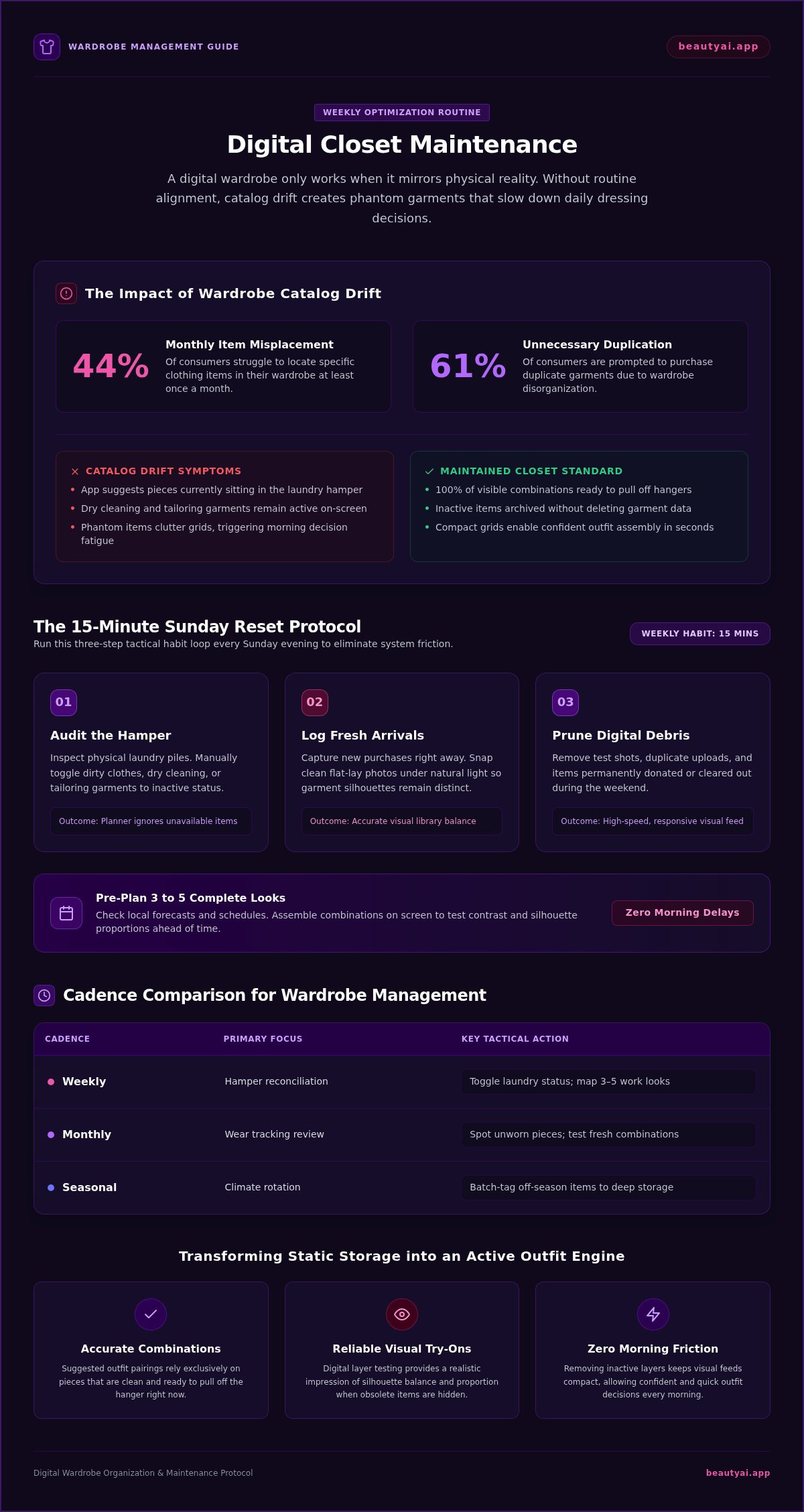
Wardrobe drift happens silently. You donate a wool sweater or send black trousers out for dry cleaning, yet both remain active on your screen. When you open your digital wardrobe app, the system still treats those pieces as available options. You assemble an outfit in the interface, only to realize the core layer is unwearable. This gap breeds frustration. Research from ClosetMaid and MDPI Sustainability found that 44% of consumers struggle to locate specific clothing items at least once a month, which prompts 61% to buy unnecessary duplicates. Clutter online creates the exact same problem.
Moving from Static Storage to an Active Outfit Engine
Your phone should serve as an everyday styling engine rather than a static visual archive. By applying core capsule wardrobe principles, you ensure your active feed includes only functional, seasonal pieces. Clean data delivers distinct benefits for daily planning:
- Accurate combinations: Suggested pairings rely strictly on pieces ready to pull off the hanger right now.
- Reliable visual try-ons: Trying on digital layers provides a realistic impression of silhouette balance and proportion when obsolete items are hidden.
- Zero morning friction: Removing inactive items keeps grids compact, letting you make confident outfit choices in seconds.
Lasting organization doesn't require exhausting seasonal purges. A simple 15-minute weekly habit keeps your library clean, responsive, and grounded in reality.
The 15-Minute Weekly Digital Closet Maintenance Checklist
Set aside fifteen minutes every Sunday evening to align your phone with your physical space. Consistent digital closet maintenance turns your wardrobe app into an agile styling engine rather than a stale photo album. Instead of spending hours on massive decluttering sessions, running through a fast habit loop keeps your rotation sharp and trustworthy.
Step-by-Step Weekly Audit Routine
Run through these three tactical steps to eliminate catalog friction:
- Audit the hamper: Check your physical laundry pile and manually toggle dry cleaning, tailoring, or dirty garments to inactive so your outfit planner ignores them.
- Log fresh arrivals: Capture new purchases immediately. When cataloging your wardrobe digitally, snap clean, flat-lay photos under natural light so the garment silhouette remains distinct.
- Prune digital debris: Delete duplicate entries, low-resolution test shots, or garments you decided to donate over the weekend.
Pre-Planning Weekly Outfits to Reduce Morning Friction
Once your catalog is accurate, map out three to five complete looks for the upcoming workweek. Check your local forecast and schedule, then assemble pairings on screen to inspect visual proportions and contrast. Testing combinations ahead of time ensures you don't waste ten minutes swapping shirts before your first meeting. If you're setting up your system for the first time, review our guide on how to build a digital wardrobe to organize your baseline categories properly. Establishing this routine saves your favorite weekday combinations so you can dress each morning with complete confidence.
Monthly and Seasonal Transitions: Keeping Your Virtual Closet Agile
Weekly check-ins handle immediate laundry status, but monthly and seasonal reviews protect your system over the long term. Scheduling extended digital closet maintenance keeps your app responsive, highlights worn combinations, and reveals genuine wardrobe gaps before you spend money on duplicate pieces.
| Cadence | Primary Focus | Key Action |
|---|---|---|
| Weekly | Hamper reconciliation | Toggle laundry status; map 3–5 work looks |
| Monthly | Wear tracking review | Spot unworn pieces; test fresh combinations |
| Seasonal | Climate rotation | Batch-tag off-season items to deep storage |
Active Racks Versus Deep Storage Categories
Never delete garments just because temperatures rise. Instead, use your virtual closet app to move heavy parkas, thermal knits, and snow boots into deep storage categories. This hides them from daily suggestions while preserving your visual catalog. Keep versatile basics, like crisp white poplin shirts and denim jackets, tagged across all seasons for effortless layering throughout spring and autumn transitions.
Evaluating Wardrobe Balance and Gaps
Conduct a monthly category scan to assess visual balance across tops, bottoms, and outerwear. If you own twelve neutral button-downs but struggle to find tailored trousers for client meetings, your closet has a structural bottleneck. Modern AI-powered styling tools make these imbalances glaringly obvious by highlighting what you actually pair together. Identifying real missing links stops impulse buying before it starts, ensuring every new addition integrates directly into your existing wardrobe rotation.
How Beauty AI Simplifies Digital Wardrobe Organization and Styling
Maintaining an up-to-date wardrobe inventory shouldn't require technical photo editing or tedious manual cropping. When you take a photo of a garment on your bed, Beauty AI removes messy room backgrounds automatically, converting snapshots into crisp catalog tiles in seconds. Once your items are logged, the platform analyzes your pieces to suggest fresh outfit combinations using clothes you already own. You receive objective visual feedback on styling elements like color harmony, contrast balance, and overall silhouette proportions.
Actionable Visual Try-On and Proportional Feedback
A consistent digital closet maintenance routine ensures your styling previews remain practical and grounded in reality. The built-in virtual try-on feature allows you to test whether an oversized trench coat balances well against cropped trousers, or if your favorite ankle boots complement a midi hemline. You can verify how colors and visible proportions look together before pulling pieces off the hanger. These try-on previews act as visual styling guides rather than guarantees of fabric comfort, exact sizing, or tailoring.
Building a Sustainable Digital Workflow
Forming a new habit works best when you start small. You don't need to digitize an entire lifetime wardrobe over a single weekend. Instead, photograph a focused 20-item seasonal capsule to test your initial weekly maintenance rhythm. Check your laundry hamper, toggle inactive pieces out of the active grid, and map out five dependable outfits for the coming workweek. Establishing this streamlined loop keeps daily dressing simple, intentional, and completely aligned with what you physically own.
Take Control of Your Wardrobe Rotation
A reliable digital wardrobe isn't built in a single marathon afternoon; it thrives on steady, realistic habits. When you commit to fifteen minutes of digital closet maintenance each week, your virtual catalog becomes an indispensable planning tool instead of a cluttered grid. Flagging dirty garments manually, archiving deep-storage layers, and testing weekday combinations keeps your mornings effortless and decisive.
Consistent organization gives you clarity, intentionality, and complete confidence in your everyday style. Ready to streamline your routine? Download Beauty AI on iOS or Android to unlock AI-powered outfit planning with clothes you already own. Use visual try-on previews to check silhouettes and proportions before pulling pieces off the hanger. Take the guesswork out of your closet and make getting dressed the easiest part of your morning.
Frequently Asked Questions
How much time should I spend on digital closet maintenance each week?
Spend roughly 10 to 15 minutes each week on digital closet maintenance. That provides enough time to review your physical laundry pile, toggle worn items to inactive, and assemble outfits for upcoming workdays. Avoid long, sporadic cleanouts that cause burnout. Short, weekly check-ins keep your catalog accurate, prevent digital clutter from accumulating, and make weekday outfit decisions noticeably faster without turning closet management into a chore.
Should I delete garments from my app when they go into seasonal storage?
Don't delete seasonal garments from your app. Deleting items wipes out their photo history, category tags, and past styling combinations. Instead, assign them to an off-season or deep-storage tag. This hides heavy coats or summer shorts from your active daily suggestions while preserving your visual inventory. When temperatures change months later, you simply toggle the category back to active with a single tap rather than re-photographing everything.
What should I do if an item in my digital wardrobe needs repairs?
Move the damaged garment to a dedicated "Repairs" or "Tailoring" category immediately. Leaving a torn blouse or unhemmed pair of trousers in your active grid causes frustration when an outfit suggestion includes them. Once you tag the item as out of rotation, it stops appearing in generated looks. After you fix the seam or pick it up from the tailor, switch its status back to active.
Can a digital wardrobe app automatically tell when my clothes are in the laundry?
No app automatically detects when physical clothes enter your hamper or washing machine. Consumer wardrobe platforms don't track laundry cycles using sensors or RFID chips. You must manually toggle garments to inactive during your routine digital closet maintenance. Taking two minutes to mark items as dirty after doing your wash ensures your daily styling tools only suggest pieces hanging clean in your closet.
What is the fastest way to photograph clothes for an accurate digital closet?
Lay garments flat on a plain bedsheet or neutral floor near a bright window. Smooth out major fabric wrinkles with your hands so the silhouette stays clearly defined. Snap photos straight down from chest height using natural daylight to keep garment colors realistic. Apps with automated background removal isolate the clothing piece instantly, eliminating the need for meticulous photo editing or studio backdrops.


