


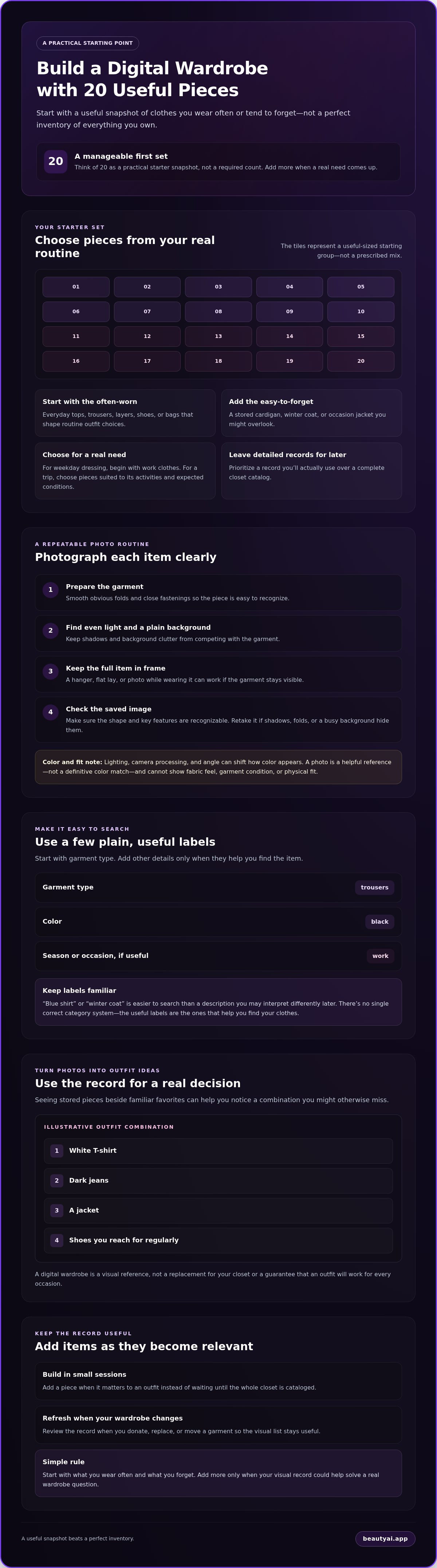
What if your first digital wardrobe needed only 20 items, not every piece in your closet? To digitize your wardrobe without turning it into a weekend project, start with clothes you wear often and pieces you forget when they’re stored away. Photograph each item in clear light, then add a few useful details, such as category, color, and season. A white T-shirt, dark jeans, a jacket, and the shoes you reach for regularly make a practical starting set.
Cataloging everything can feel like too much, especially if the photos become a list you never use. Build a visual record in small batches instead. This article walks you through choosing your first 20 items, taking clear photos, and organizing them so you can find pieces and plan outfits. You’ll also learn how to keep the collection current as your wardrobe changes. Seeing a stored cardigan beside your everyday trousers, for example, may help you spot an outfit you’d otherwise overlook. Start with a useful snapshot, not a perfect inventory.
Key Takeaways
- Start with 20 useful pieces, not a complete closet inventory, to digitize your wardrobe without making setup feel overwhelming.
- Photograph each garment in clear light against a simple background, then check that the saved image is easy to recognize.
- Use a few consistent labels, such as garment type, color, season, or occasion, so you can find pieces without lengthy cataloging.
- Make the digital record practical by using it to compare outfit combinations for a real occasion.
Table of Contents
Why digitize your wardrobe instead of relying on memory?
A digital wardrobe is a visual record of clothes you own, not a replacement for your physical closet. It can help when a garment is tucked away, you can’t remember what you have, or you want to compare outfit options without pulling everything out. Seeing a stored cardigan beside your everyday trousers, for example, may remind you of a combination you haven’t worn in a while.
Use the record to make choices easier, not to judge your style. Clothing photos can support outfit planning, but they can’t guarantee a great outfit and won’t stay accurate without occasional updates. Making more use of clothes you already own can complement the aims of Sustainable fashion, though a digital record alone doesn’t ensure more sustainable choices. For a fuller setup walkthrough, see this guide to building a useful digital wardrobe.
What belongs in a useful digital wardrobe?
Start with wearable clothes that affect everyday decisions: tops, trousers, dresses, outerwear, and frequently used accessories such as shoes or bags. Choose pieces from different parts of your routine, including everyday basics and items you might overlook. Add seasonal or occasion-specific clothes if they’re easy to forget, like a winter coat in storage or a jacket for formal events. Detailed records you won’t use can wait.
How much of your closet should you digitize first?
Choose a manageable group connected to a real need, rather than cataloging everything at once. If weekday dressing feels difficult, start with work trousers, shirts, layers, and shoes you wear regularly. If you’re preparing for a trip, begin with clothes suited to its activities and expected conditions. There’s no required item count. Add more only when you notice a gap the visual record could help solve.
How to photograph clothes for a digital wardrobe
Use a simple sequence: choose one garment, prepare it, take a clear photo, then check the saved image. Smooth obvious folds, close fastenings, and move the item somewhere with even light and a plain background. Keep the full garment in frame so its shape and key features are easy to recognize. A hanger, flat lay, or photo while wearing it can all work if the item stays visible.
Set up a clear, repeatable clothing photo
Pick a spot where shadows and background clutter won’t compete with the garment. A consistent angle makes your collection easier to scan, but the photos don’t need to look identical. Take a detail shot only when it helps distinguish the item, such as a patterned collar or distinctive sleeve. After taking the photo, open it and check that the garment is recognizable before moving on.
What if a photo does not show the garment accurately?
Retake it if deep shadows, folds, or a busy background hide the cut or pattern. If a dark shirt looks like a black shape, move it into brighter, indirect light and try again. Lighting, camera processing, and angle can all shift how a color appears, so treat the screen image as a helpful reference, not a definitive color match. A photo also can’t tell you how fabric feels, verify a garment’s condition, or establish physical fit.
Clear photos make it easier to recognize what you own. Research on virtual wardrobes also explores whether they can help users reduce their overconsumption. A practical first step is to make each saved image clear enough to help you find and identify the garment later.
How to organize clothing photos so you can find outfits later
Choose a few labels that match the way you look for clothes. Garment type is a useful starting point; add color, season, or occasion only if those details help narrow your choices. For example, “trousers,” “black,” and “work” can make a pair easier to find when you’re planning an office outfit. Keep the system simple enough to use every time you add an item to your digital wardrobe.
Which wardrobe categories make items easier to find?
Start with plain, familiar terms rather than style jargon. Label a piece “blue shirt” or “winter coat,” not a description you might forget or interpret differently later. Add occasion labels such as “work” or “formal” only when you expect to search that way. There’s no single correct category system. The best labels are the ones that help you find your own clothes.
How should you add items without creating a backlog?
Build the record in small sessions, or add an item when it becomes relevant to an outfit. Prioritize pieces you often wear, store away, or struggle to remember. If you spot a missing photo while planning an outfit, add it then rather than postponing the project until your closet is cataloged.
Keep entries current with a light review when your wardrobe changes. If you donate, replace, or move a garment into seasonal storage, update its record if that change affects how you’ll search for it. Skip details that don’t help you recognize or combine the item. For a broader setup approach, see this guide to building a useful digital wardrobe.
Use your digital wardrobe to plan real outfits
Put the catalog to work by starting with a real occasion. For a casual office day, find one base item, such as black trousers, then compare tops, layers, and shoes already in your wardrobe. A white shirt with loafers may feel more polished; a knit top and ankle boots could suit a cooler day. The goal isn’t to create endless combinations. Make a short list, then check it against the occasion, weather, and what feels comfortable to wear.
Turn a clothing catalog into an outfit shortlist
Choose a familiar base garment and swap one piece at a time. Try the same jeans with a striped shirt, a plain tee, or a sweater, then compare jackets or shoes if they change the outfit’s formality. If your app supports saving outfits, keep combinations you expect to wear again. If it doesn’t, use a note or make the choice in your physical closet. For more ways to make a catalog useful when getting dressed, read this digital wardrobe planning guide.
Use AI suggestions as input, not a verdict
AI feedback can offer another view of visible styling, color balance, and whether an outfit appears suited to an occasion. Treat it as a prompt, not a rule: you know best whether the combination matches your taste, the actual weather, and the event. Feedback can’t measure physical fit, fabric feel, or comfort. Virtual try-on images are approximate visualizations, not evidence of real-world fit, size, or tailoring.
Beauty AI’s digital wardrobe lets you organize clothes and plan outfits with items you own. The app also offers AI style feedback, color analysis, and virtual try-on. Learn more about the digital wardrobe feature or the app for iPhone and Android.
Start with a wardrobe record you’ll actually use
A useful digital wardrobe doesn’t need to capture every detail or stay perfect. To digitize your wardrobe, begin with clothes that help solve a real dressing problem, take clear photos, and use a few straightforward labels so you can find pieces again. Add items gradually as you wear or look for them.
Then put the record to work. Choose an upcoming occasion, compare combinations from clothes you own, and adjust for your preferences and the day’s conditions. The aim is to make getting dressed easier, not to follow a system that feels like extra work.
Beauty AI is available for iPhone and Android, with a digital wardrobe for organizing clothing and planning outfits with pieces you own.
Frequently Asked Questions
How do I digitize my wardrobe without photographing every item?
Start with clothes you wear often or sometimes forget you own. Photograph a small, useful selection, such as your regular work clothes or pieces you’re considering for an upcoming trip. Add more as you plan outfits or bring stored items back into use. A complete catalog is optional; the goal is to create a visual record that helps with real wardrobe decisions.
What is the best way to take pictures of clothes for a digital wardrobe?
Use clear lighting, a simple background, and a view that makes the whole garment recognizable. You can photograph it on a hanger, laid flat, or while wearing it, as long as its shape and details remain visible. Check the saved image for shadows or clutter. Lighting and camera processing can shift colors, so treat photos as practical references, not exact color measurements.
Should I include shoes and accessories in my digital wardrobe?
Include shoes and accessories when they help you remember or combine the clothes you own. You might start with the shoes and bag you regularly pair with work outfits, then add other pieces when they matter to a planned look. There’s no need to catalog every accessory at the outset. Build a record around how you get dressed, not a mandatory inventory format.
Can an AI wardrobe app tell whether an outfit will fit or feel comfortable?
No. AI styling feedback can comment on visible styling, color, proportion, and occasion, but it can’t measure physical fit, assess fabric feel, or guarantee comfort. Virtual try-on images are approximate visualizations, not proof of size, tailoring, or real-world fit. Check garments in person when possible, and use your own judgment about movement, comfort, and whether an outfit suits your preferences.
Try Beauty AI on iPhone or Android and start building a digital wardrobe with clothes you already own.


