


What if the only thing standing between you and a perfectly balanced wardrobe is the angle of your smartphone camera? To ensure accurate results, you must position your lens at navel height and shoot in diffused natural light to prevent color distortion and perspective shifts. Capturing a precise outfit photo for styling feedback is the essential first step in transforming your phone into a reliable personal style architect. It's a common frustration when AI misidentifies colors or proportions, but these technical adjustments ensure the digital tools see exactly what you see in the mirror.
Mastering this process allows you to receive instant, accurate feedback on outfit balance while building a digital closet that feels professional and organized. This guide outlines how to optimize your environment to eliminate busy backgrounds and lighting shifts that often confuse garment detection. By following these methodical steps, you'll reduce the daily friction of dressing and ensure your styling feedback is consistently sharp. Transitioning from abstract inspiration to concrete planning starts with a clear, high-fidelity image that removes all guesswork from your routine.
Key Takeaways
- Utilize indirect natural light and neutral backgrounds to ensure the AI accurately distinguishes garment colors and textures from your surroundings.
- Position your camera lens at navel height to capture the ideal outfit photo for styling feedback that preserves your natural body proportions.
- Prepare your garments by smoothing out deep creases and ensuring your waistline is visible for a more precise analysis of silhouette and balance.
- Upload high-fidelity images to your digital wardrobe to enable reliable virtual try-ons and streamline your daily dressing routine.
Table of Contents
Why Your Photo Quality Dictates the Quality of AI Styling Feedback
AI styling feedback is the algorithmic analysis of your clothing's color, proportion, and silhouette. It functions as a digital mirror that evaluates how individual pieces interact to create a cohesive look. When you upload an outfit photo for styling feedback, the system relies on pixel-level clarity to identify where a blazer ends and a shirt begins. Blurry images create visual noise that prevents the software from distinguishing between textures and layers. This noise degrades the performance of the AI Stylist App. This feedback evaluates visible styling choices, not physical garment measurements or fabric feel. Accuracy depends entirely on the data you provide; high-fidelity photos turn a guess into a professional style strategy.
- Resolution: Sharp enough to see fabric weave and seams.
- Lighting: Natural, indirect daylight to preserve color integrity.
- Background: Neutral and high-contrast for sharp edge detection.
Color Accuracy and Lighting Interference
Lighting is the primary variable that skews digital results. Warm indoor bulbs cast a yellow tint that can shift a cool palette into a warm category in the eyes of the software. Using computer vision image processing, the app extracts hex codes from your photo to determine color harmony. Use indirect daylight to ensure the resulting color analysis is accurate and reliable.
The Role of Contrast in Edge Detection
The AI identifies your body's outline by detecting contrast between your clothes and the background. If you wear a navy coat against a dark wall, the edges bleed together. Stand against a neutral, high-contrast backdrop to improve edge detection. This clarity allows the system to map your outfit's balance accurately, ensuring your digital wardrobe strategy is based on visual facts rather than distorted pixels.
The Technical Setup: Lighting, Angles, and Backgrounds
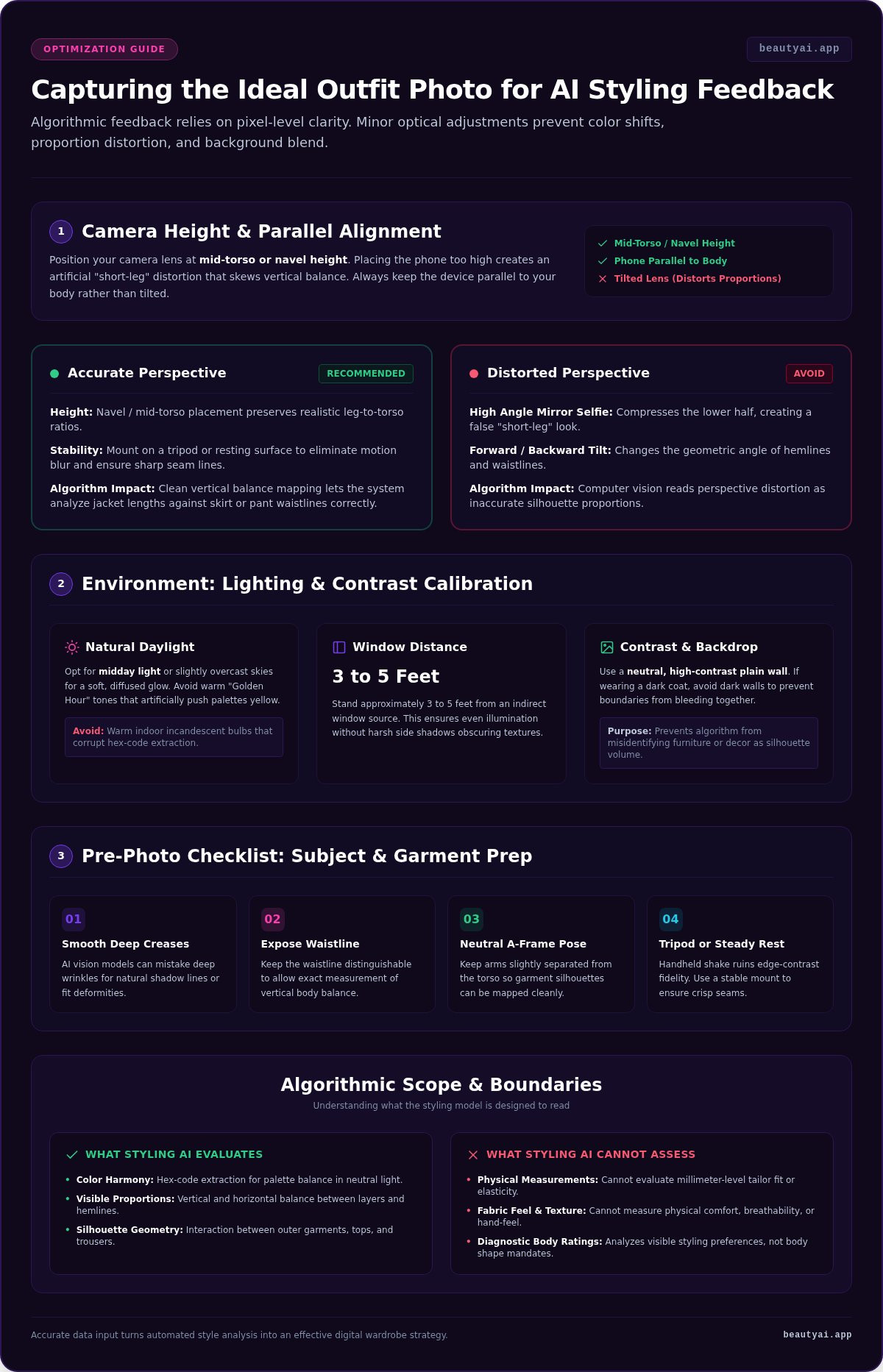
Achieving a high-fidelity outfit photo for styling feedback requires more than a simple mirror selfie. You must control your environment to ensure the algorithm captures accurate data. Prioritize natural, indirect sunlight to reveal true garment colors without creating harsh shadows that obscure seams or textures. Choose a neutral, uncluttered background. A plain wall prevents the AI from misidentifying furniture or home decor as part of your silhouette, ensuring the analysis remains focused solely on your sartorial choices.
Finding the Best Natural Light
Stand approximately 3 to 5 feet away from a window during daylight hours. While "Golden Hour" is popular for social media, its warm tones can shift your color profile too far into the yellow spectrum. Opt for midday light, especially on slightly cloudy days, as it provides a diffused glow that mimics standard portrait photography lighting setups. This flat, even light allows the AI to see the true saturation of your navy wool trousers or cream silk blouse without artificial interference.
Camera Positioning to Avoid Proportion Distortion
Position your camera at mid-torso or navel height. Placing the lens too high creates a "short-leg" effect that makes outfits look disproportionate. Keep the phone parallel to your body instead of tilting it forward or backward. Perspective distortion is a primary cause of inaccurate feedback on silhouette balance. Use a tripod or a stable surface to eliminate motion blur. Sharp edges are essential for the software to analyze how a tailored jacket interacts with the waistline of your skirt. Once your setup is optimized, you can start capturing your wardrobe with professional clarity to get the most out of every analysis.
Your Pre-Photo Checklist: Preparing Your Garments and Self
Preparing your physical garments is just as critical as the camera settings. High-quality data requires a clean subject to ensure the algorithm doesn't mistake clutter for style. AI vision often interprets deep creases as shadows or fit issues, so smooth out major wrinkles before taking an outfit photo for styling feedback. Ensure your waistline is visible to allow for accurate vertical proportion analysis. Once dressed, stand in a neutral A-frame pose with arms slightly away from the body to define your silhouette clearly. Finally, take a test shot to verify that your Type 2 lighting captures the true hue of garments, such as navy blue pants, without washing them out.
Garment Prep: Steam, Tuck, and Layer
Visual order starts with how you wear the pieces. A half-tuck or full-tuck helps the outfit generator app understand exactly where your legs begin. This visibility is essential for calculating the "rule of thirds" in your styling. Follow the Sleeve Gap rule by keeping a small space between your arms and torso. Without this gap, the AI might merge your sleeves into your waistline, resulting in a boxy or distorted silhouette detection. It's a simple adjustment that prevents the software from miscalculating the width of your midsection or the length of your arms.
The Neutral Pose for AI Accuracy
Avoid fashion poses like crossing your legs or leaning on one hip. These angles shift your center of gravity and lead to inaccurate feedback on outfit balance. When the software analyzes your outfit photo for styling feedback, it looks for symmetry to determine if a blazer is too long or if trousers are correctly tapered. Look straight ahead to maintain a neutral neck and shoulder line. This disciplined approach ensures the digital architect can evaluate your style choices based on a clean, symmetrical data set. Download the app to start uploading your prepared looks for instant analysis.
Transforming Your Photos into a Digital Wardrobe Strategy
Capturing the perfect image is only the beginning. Once you have a high-fidelity outfit photo for styling feedback, you can transition from daily guesswork to a structured sartorial plan. Upload your optimized files to a digital wardrobe app to begin building a comprehensive visual library. This database allows the AI to recognize patterns and provide data-driven recommendations based on your actual inventory.
Use the Virtual Try-On feature to preview new combinations without the physical effort of changing clothes. Because your photo is clear, the software can accurately overlay new items onto your existing frame. Review AI suggestions for styling upgrades. The system might suggest adding a tan leather belt to define your waist or switching to a burgundy loafer to improve color harmony. Tag your photos by occasion or weather to refine future suggestions.
Uploading to Beauty AI for Instant Feedback
Uploading your outfit photo for styling feedback triggers an immediate analysis of color balance and proportion. The system evaluates how your garments interact, identifying if a hemline cuts your silhouette or if a color palette feels disjointed. Use the virtual closet app to experiment with what-if scenarios. You can swap a blazer or adjust a layer virtually to see the immediate impact on your overall look before you leave the house.
Building a Consistent Style Log
Commit to daily photo tracking to observe how your aesthetic evolves over a month. This log provides a clear record of your most successful combinations. Use the cost per wear calculator to identify which photographed items provide the most value. Seeing the data behind your wardrobe helps you make intentional decisions about future purchases. To begin optimizing your closet, download Beauty AI on iPhone or Android and start your digital style log today.
Mastering the Digital Mirror
Optimizing your photography turns a simple snapshot into a high-fidelity data point. By prioritizing diffused natural light and navel-height camera positioning, you eliminate the perspective distortion that often leads to inaccurate styling advice. These methodical adjustments ensure that every outfit photo for styling feedback provides the clarity necessary for precise color and proportion analysis. You've prepared your garments and controlled your environment; now it's time to let the technology execute your style strategy.
Building a digital wardrobe is a skill that removes the friction of daily decision-making. With your high-quality photo library, you can experiment with virtual try-ons and receive styling upgrades that refine your personal aesthetic. Ready to see your closet in a new light? Download Beauty AI and get professional outfit feedback today. The service is available on both iOS and Android to help you transition from abstract inspiration to concrete planning. Start building a more intentional, organized style routine today and reduce your daily decision fatigue.
Frequently Asked Questions
Does Beauty AI measure my exact body measurements from a photo?
Beauty AI does not measure exact physical body dimensions or garment sizing from your photos. The technology focuses on analyzing the visual relationship between pieces, such as silhouette balance and color harmony. While it can identify if a blazer appears long relative to your trousers, it cannot provide the precise chest or waist measurements required for tailoring. Use the feedback as a guide for styling choices rather than a substitute for a tape measure.
Can I use a mirror selfie for AI styling feedback?
You can use a mirror selfie, but it isn't recommended for high-fidelity results. Mirror angles often introduce perspective distortion and hide essential details like necklines or collars behind your smartphone. For the most accurate outfit photo for styling feedback, use a tripod or prop your phone on a stable surface at navel height. This setup ensures the AI captures your true proportions without the asymmetrical lean typical of handheld selfies.
What should I do if my room has no natural light?
If natural light is unavailable, use a cool-toned LED bulb or a ring light set to a daylight temperature between 5,000K and 6,500K. Avoid standard warm yellow indoor bulbs, as they create artificial color casts that skew the algorithm's analysis. Positioning two light sources at 45-degree angles from your body helps eliminate harsh shadows. This setup preserves the true hue of your garments and ensures the digital wardrobe feedback remains reliable.
How many photos do I need to upload for useful feedback?
A single high-quality photo is sufficient for an immediate analysis of one outfit. To receive more comprehensive styling feedback over time, aim to upload daily looks to build a digital style log. This consistency allows the system to identify recurring patterns in your wardrobe and suggest more personalized styling upgrades. Capturing one clear, full-body shot per outfit ensures the AI can evaluate the total balance from head to toe without missing details.
Is the AI feedback definitive for my skin tone and color season?
The AI provides styling suggestions based on visual harmony, but these results aren't scientifically definitive diagnostic facts. Factors like camera processing and shifting light conditions can influence how colors appear in your outfit photo for styling feedback. Use the color analysis as a functional guide to explore flattering palettes rather than a medical or ethnic identification. Ultimately, these recommendations are preferences designed to help you experiment with confidence and intentionality.
After taking the photo, use this outfit symmetry feedback checklist to assess balance and proportion before changing the look.

