


To find shoes by picture, crop the image around one shoe, search it with Google Lens, and compare the shape, sole and panel details before trusting a result. If a model number is visible on a label, search that text too. A visually similar result is a lead—not proof that you have found the same model.
I would separate this into two decisions: which shoe is it? and would I actually wear it? The first needs product evidence; the second needs your clothes, your routine and your budget. Beauty AI can help with that outfit decision once you have identified a pair.
Start with the strongest image you have
- Use the original photo or a sharp video frame. Pause when the foot is still. A screenshot of a screenshot loses useful stitching and sole detail.
- Crop to one shoe, leaving its full outline. Keep the toe, heel and sole; remove faces, captions and other outfits. Save a second crop if another angle shows more.
- Keep the evidence unchanged. Do not use generative editing to sharpen a logo or invent missing texture. Correcting brightness may help you see, but keep the original for comparison.
- Search the shoe, then refine. Upload the crop to Lens in the Google app or use image search on your computer. Try a second angle if the first results mostly match the outfit rather than the footwear.
Google describes image, camera and text-assisted searching on its official Lens page. For a fuller walkthrough of the interface, see my Google Lens clothing-search guide.
Which tool should you use?
Quick route on iPhone and Android
Open the Google app, tap the Lens icon in the search bar, choose your saved photo and move the selection box around the shoe. Open a promising result, not just its thumbnail. Google's image-search instructions cover device differences. Button names can vary with language and app version.
For a screenshot from Instagram or a video, use the image file rather than the social post's URL. Keep the original post too: a product tag, caption or reply from the creator may identify the shoe more directly than visual similarity.
| Tool or source | Best use | What still needs checking |
|---|---|---|
| Google Lens | Find visually related product pages and possible model names from a photo. | Exact model, colourway, availability and retailer credibility. |
| Pinterest visual search | Explore a silhouette or styling direction when you do not need the identical pair. | A pin may not lead to a current product listing. |
| Brand or retailer search | Confirm a candidate using a model name, product code and official photographs. | Regional sizing, materials, stock and returns. |
| Beauty AI | Continue the fashion decision: explore similar clothing with Beauty Lens and build outfits around your wardrobe. | Do not treat an AI suggestion as authentication or guaranteed identification of a shoe. |
Pinterest explains its photo-based discovery in Pinterest Lens help. My broader photo-search app comparison covers clothing as well as the differences between discovery and verification.
Identify the details that distinguish one pair from another
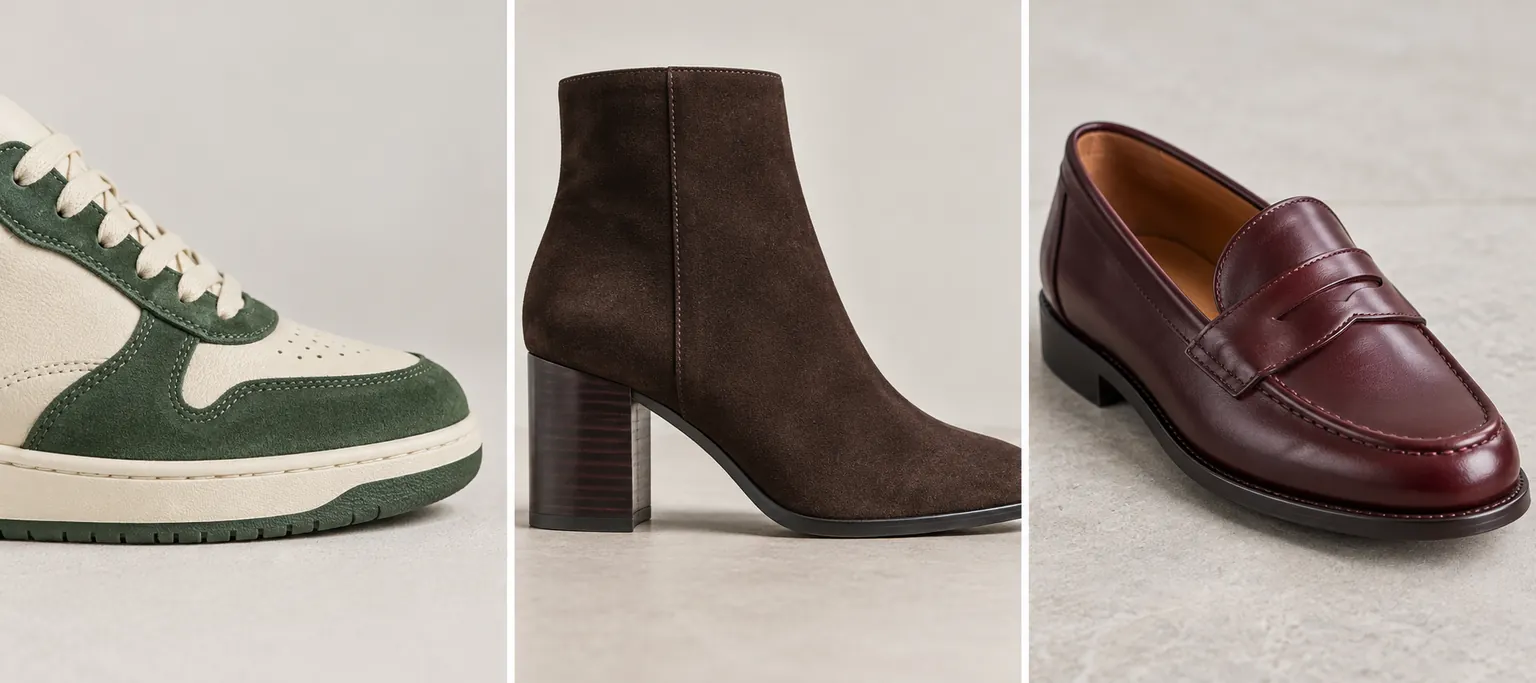
| Shoe type | Compare first | Useful search refinement |
|---|---|---|
| Sneakers | Panel seams, eyelets, toe perforations, midsole shape and heel tab. | Combine a visible brand or model clue with the colourway. Do not guess a logo. |
| Boots | Shaft height, toe shape, heel profile, elastic panels or zip, and outsole edge. | Try a precise phrase such as “brown square-toe block-heel ankle boots”. |
| Heels and flats | Strap positions, buckle, toe opening, heel shape and upper construction. | Use the distinctive detail: “black slingback pointed toe silver buckle”. |
| Loafers | Apron stitching, saddle or hardware, lug depth and toe proportions. | Add “penny”, “tassel” or “lug sole” only when the photo supports it. |
These example phrases describe features; they are not claims about the brands in the illustrations. Colour is a weak clue on its own because lighting, filters and screen settings can change it.
Exact match, plausible match or just a lookalike?
An exact-match candidate should agree on several structural details and have a product page that confirms its identity. A readable product code from your own shoe is particularly useful. On a seller listing, compare that code with the brand's information rather than accepting the listing title alone.
A plausible match has the right shape and features but lacks enough evidence to confirm the version or colourway. Save the candidate and look for another angle. A lookalike shares the overall style but differs in the sole, seams or hardware. It can still be a good purchase if you deliberately want an alternative.
For example, two cream-and-green sneakers can look almost identical at thumbnail size. If the heel tab or side panel differs, stop calling it the same shoe. With boots, a similar upper on a different heel can change both the appearance and how you walk in them. These are comparison examples, not reported product tests.
If the search cannot find the shoes
A simple candidate note prevents repeated dead ends
For each plausible result, record model name → product-page link → matching details → conflicting details → available size. If the sole differs, reject the candidate even when its colour matches. If you cannot see the deciding detail, label it unconfirmed. Stop once you have a verified model or a deliberately chosen alternative; opening twenty near-identical listings is not progress.
- The image is tiny: find the original post, a better frame or another photograph. More searches cannot recover details that are absent.
- There are too many unrelated results: crop more tightly and add one distinctive feature, not a long list of guesses.
- The pair is old or discontinued: search a confirmed model name on reputable resale sites, then check condition and seller protection.
- Only similar pairs appear: decide whether similarity is enough. Set your non-negotiables—heel height, toe shape or colour—before browsing alternatives.
If you have the shoes in hand, photograph any size or product label. Avoid posting personal information visible on receipts or parcel labels. An image search cannot certify authenticity, comfort or fit.
Before you buy: verify the pair and the outfit
Open the actual retailer page. Check the model, size system, materials, delivery costs, return window and whether the photographs show the same version. An attractive search preview can point to an unavailable size or an outdated listing. For resale, inspect wear on the sole and heel, and use a payment method with appropriate buyer protection.
Then ask a wardrobe question: can you name three outfits you would wear with this pair? I would start with clothes you already own, rather than build an expensive new wardrobe around a search result. Beauty AI's digital wardrobe helps you organise those pieces and work on outfit combinations. It does not replace checking the seller or trying the shoes for fit.
If you are cutting down on duplicate purchases, use my Project 333 wardrobe list to assign each pair a real job. Finding the right shoe is useful; finding a shoe that earns a place in your closet is the better outcome.


