

An AI clothes changer edits the outfit shown in a photo. That can help explore a color, garment category, or styling direction, but a convincing image is not evidence that a real product will fit, drape, or look the same in person.
How I evaluated AI clothes changer tools
Written and tested by David Voskanyan. I evaluated the documented workflows against four scenarios: changing one garment in a clean front-facing photo, describing an outfit with text, using a preset or reference image, and deciding whether the result is useful enough to continue into shopping or styling.
The repository contains saved first-party screens for Beauty AI, Fotor, LightX, Redress, and Pincel, plus official product sources for Beauty AI, Fotor, LightX, and Redress. Those sources were rechecked on July 18, 2026. No shared input photo, output set, generation time, credit balance, or test device is documented across all five products. I therefore do not claim a controlled realism or speed winner.
Scoring criteria: visible input control, clarity of the upload flow, evidence of output, usefulness after generation, and practical risk. I looked specifically for body consistency, fabric edges, hands, shadows, and layers, but I report a result only when the repository preserves it.
Editorial disclosure: Beauty AI publishes this guide and appears in it. It is included as the decision layer after an outfit edit, not because it replaces every specialist editor. No competitor paid for inclusion or placement.
What the repository evidence can verify
| Tool | Visible evidence | Evidence limit |
|---|---|---|
| Beauty AI | Outfit analysis, wardrobe context, and visual-search entry points | No preserved screen of Beauty AI performing the clothes swap |
| Fotor | A browser page that offers upload, prompts, or presets | The saved screen is before upload; it does not prove output quality |
| LightX | An upload action, text-prompt positioning, presets, and sample creation | No same-input result is preserved |
| Redress | A before-and-after marketing image and store buttons marked “Coming soon” | Availability and live mobile workflow were not demonstrated in the capture |
| Pincel | A first-party before-and-after example and prompt-led editor positioning | A promotional example is not an independent or repeatable benchmark |
Best AI clothes changer tools by job
1. Beauty AI

Beauty AI is relevant after an edit has been generated. Its documented interface can help assess an outfit, relate the direction to wardrobe items, and continue into visual search. The repository does not show Beauty AI as the engine creating the synthetic garment swap, so this article does not present it as one.
David's verdict: What worked: it gives the generated idea a practical next step. What failed: it should not be chosen when the only job is editing pixels in a photo. Best for: judging whether a changed outfit is worth wearing, searching, or recreating. Choose another tool when: use Fotor, LightX, or Pincel when you first need to generate the edited image.
2. Fotor AI Clothes Changer

Fotor's preserved mobile web page clearly describes three inputs: uploading outfits, writing prompts, or using presets. The page also presents an upload area in the browser, which makes it a concrete no-install starting point.
David's verdict: What worked: the input options are clear before a photo is submitted. What failed: the saved screen stops before generation, and a cookie dialog partly covers the upload area; no output, credit cost, or processing time is documented. Best for: a quick browser-based experiment. Choose another tool when: LightX exposes a similarly direct upload with visible sample presets; Pincel provides a preserved first-party before-and-after example.
Open Fotor AI Clothes Changer.
3. LightX AI Clothes Changer
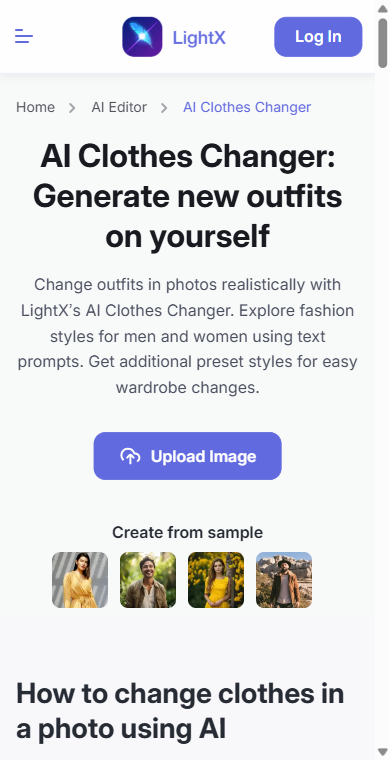
LightX's captured page shows a prominent upload action, text-prompt positioning, sample images, and a separate explanation of the change-clothes workflow. That makes the first step easy to understand without inferring hidden functionality.
David's verdict: What worked: the browser flow communicates upload and prompt control clearly. What failed: the repository contains no same-input output for evaluating hands, hems, shadows, or layered clothing. Best for: prompt-led exploration of garment categories and colors. Choose another tool when: use Pincel when seeing a preserved example before upload matters, or Beauty AI after generation when the question becomes outfit judgment.
Open LightX AI Clothes Changer.
4. Redress
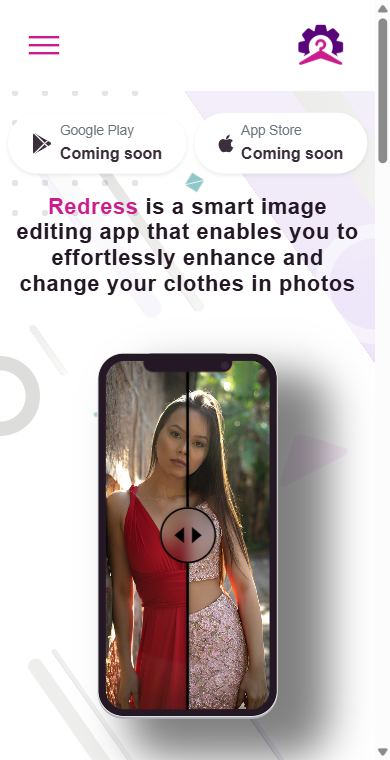
The saved Redress page describes a smart image-editing app and shows a split before-and-after fashion image. More importantly, the same capture labels both Google Play and App Store as “Coming soon.” That is a material availability warning, not a detail to hide.
David's verdict: What worked: the product communicates the intended mobile clothes-change concept. What failed: the preserved evidence did not show a downloadable app or a live editing flow at capture time. Best for: monitoring as a mobile-first option if current availability can be confirmed. Choose another tool when: use Fotor or LightX when you need a browser workflow that is visibly actionable in the saved evidence.
Check the current Redress product page before relying on store availability.
5. Pincel AI Clothes Changer
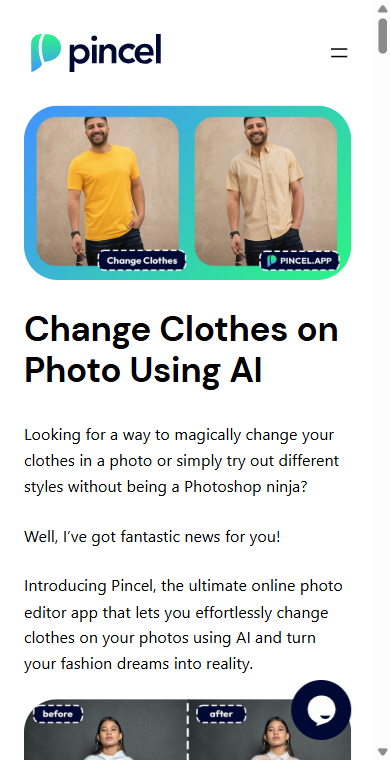
Pincel has the strongest preserved example among the specialist editors in this article: its page shows the same person in a yellow T-shirt and a beige short-sleeve shirt, plus another before-and-after section lower on the page. That verifies how Pincel markets the output, not how consistently it reproduces that quality.
David's verdict: What worked: users can inspect a concrete first-party transformation example before starting. What failed: one curated promotional result cannot establish repeatability, identity preservation, or garment accuracy. Best for: concept creation where a visible example matters more than retailer-specific fit. Choose another tool when: use a product-linked virtual try-on when the goal is buying one exact garment, or Beauty AI when the edit needs wardrobe and style context.
Open Pincel's AI clothes changer page.
A repeatable test you can run yourself
- Use one consented photo. Choose a front-facing, well-lit image with visible hands and a simple background.
- Change one variable. Ask for one garment and color, not a new body, pose, location, and outfit at the same time.
- Repeat the same instruction. Compare two generations from the same tool before trusting a lucky result.
- Zoom into failure areas. Check fingers, hair overlap, neckline, cuffs, hems, bags, and cast shadows.
- Separate concept from commerce. If you like the direction, find a real product and evaluate measurements, material, reviews, and returns independently.
Which tool should you use?
| Need | Start with | Reason |
|---|---|---|
| Generate a quick browser edit | Fotor or LightX | Both preserved pages expose a direct upload flow |
| Inspect a first-party example first | Pincel | The saved page includes a visible before-and-after transformation |
| Use a mobile-first product | Redress, only after checking availability | The captured page marked both stores as coming soon |
| Preview one exact product | A retailer or virtual try-on tool | A generic clothes changer does not prove product fit |
| Judge the generated outfit | Beauty AI | Its documented role is analysis, wardrobe context, and next-step discovery |
Privacy and safety checks
- Upload only images you own or have permission to use.
- Read the current upload, retention, deletion, and model-training terms before submitting a full-body photo.
- Do not assume a “free” landing page means unrestricted generations; confirm credits and regional pricing before upload.
- Do not use a generated image as evidence of real fit or as a deceptive representation of another person.
FAQ
Which AI clothes changer is best?
The available evidence supports different answers by job. Fotor and LightX have clear browser upload flows; Pincel preserves a concrete promotional example; Redress requires an availability check. None has a controlled same-input accuracy result in this repository.
Is an AI clothes changer the same as virtual try-on?
No. A clothes changer creates a synthetic outfit image. A product-linked virtual try-on is intended to preview a specific item. Neither proves exact size, comfort, fabric, or construction.
Where does Beauty AI fit?
Beauty AI fits after generation. Use it to evaluate the outfit direction and connect the idea to wardrobe or visual-search decisions, not as evidence that the synthetic garment exists or fits.
Bottom line
The strongest evidence-based recommendation is not a universal winner. Fotor and LightX are the clearest browser entry points in the saved captures, Pincel shows the clearest preserved before-and-after example, and Redress carries an explicit availability caveat. Beauty AI is the follow-on decision tool, not the specialist image editor.
For a product-specific workflow, continue with virtual try-on apps. For a single-image tutorial, see how to change clothes in a photo with AI.


